Web Application Basics | TryHackMe Walkthrough
Just getting started with web hacking? This TryHackMe lab is the perfect intro! Learn how web apps communicate through HTTP, how URLs are…

Just getting started with web hacking? This TryHackMe lab is the perfect intro! Learn how web apps communicate through HTTP, how URLs are structured, what request methods like GET and POST do, and how to decode response codes and headers. This is foundational knowledge every cybersecurity learner needs.
Please continue reading from here as the post is very long, thank you!
TryHackMe Web Application Basics Description
Learn the basics of web applications: HTTP, URLs, request methods, response codes, and headers.


Web Application Overview
Front End: The Face of the Web
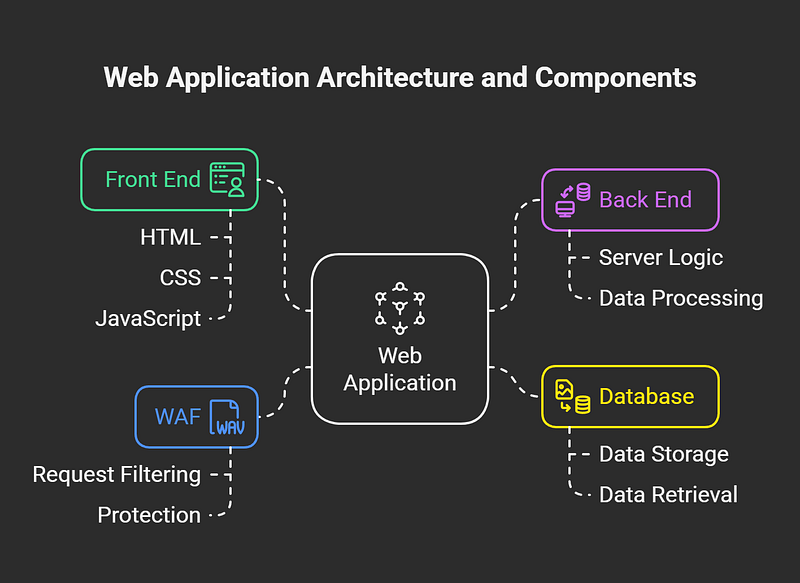
Think of the Front End of a web application like the surface of a planet — the part an astronaut can actually see and interact with, shaped by the natural laws around it. For users, this interaction happens through technologies like HTML, CSS, and JavaScript.

HTML — The Basic Structure
Visual: A lifeless gray planet, bare and unmoving.
HTML (Hypertext Markup Language) acts as the building blocks of a webpage. It tells your browser what to display, headings, text, images, links, but nothing fancy. It’s like the DNA of simple life forms: it holds the basic instructions, but not much personality or flair.
CSS — Adding Style and Beauty
Visual: The same planet now vibrant and colorful with textures, patterns, and lush landscapes.
CSS (Cascading Style Sheets) is what brings the webpage to life visually. It defines colors, fonts, spacing, and layouts, basically, how everything looks. If HTML is the DNA, CSS is the part that describes appearance, like eye color, shape, and size in an organism.
JavaScript — Bringing It to Life
Visual: A planet that now moves, responds, and adapts, animated with intelligent behavior.
JavaScript (JS) introduces interactivity and logic. It makes the page dynamic, handling clicks, form submissions, animations, and more. In our planet metaphor, JavaScript is the brain of the organism, making decisions and responding to the environment in real time.
Back End: The Hidden Machinery
Now let’s look beneath the surface, the Back End, where all the behind-the-scenes magic happens. You can’t see it in the browser, but it’s what makes everything work, like the gravity holding everything in place or the air you breathe.
Databases — Storing the Knowledge
Visual: A thriving ecosystem, forests, rivers, libraries, and data-rich landscapes.
Databases store, update, and retrieve information. Whether it’s your login credentials or a user’s preferences, it all lives here. Imagine a planet where intelligent life keeps maps, diaries, books, and files neatly stored for reference and use, just like a database does for a website.
Infrastructure — The Foundations and Highways
Visual: Interconnected roads, tunnels, power lines, and flowing traffic systems.
A web application runs on a mix of servers, storage, and network systems, the infrastructure. Think of it like a planet’s transportation and energy systems: the roads (network), cars (data), and the fuel (processing power) that keep everything running smoothly.
WAF — The Planet’s Protective Shield
Visual: A glowing ozone layer surrounding the planet, shielding it from harmful rays.
The Web Application Firewall (WAF) acts like the atmosphere of your digital planet. It filters out harmful traffic and blocks potential threats before they can reach your server. Just as a planet’s atmosphere protects life from radiation, the WAF defends your app from cyber attacks.
Uniform Resource Locator
A URL isn’t just a web address, it’s a collection of parts that work together to get you to the right place on the internet. Whether you’re browsing, building websites, or troubleshooting issues, understanding these parts can really help.
1. Scheme (Protocol)
The scheme tells your browser how to connect to a website. You’ll most often see:
- http:// — HyperText Transfer Protocol
- https:// — Secure version with encryption
Why it matters: HTTPS is the safer option. It encrypts your connection, keeping your data private. That’s why modern websites, and cybersecurity professionals, prefer and enforce HTTPS.
2. User Info (Optional)
Some URLs may include login details (usually a username, sometimes a password). For example: https://username@website.com
Why it matters: This method is outdated and risky. Exposing credentials in URLs can lead to serious security issues. Most sites now avoid this.
3. Host / Domain
This is the core of the URL — it tells your browser which site to visit. Example: example.com
Why it matters: Domains are unique and registered officially. Watch out for: Slightly misspelled domains used in phishing (called typosquatting), like g00gle.com.
4. Port
A port tells the browser which service on the server to talk to. You might not see it unless it’s non-standard, like:
- :80 — Default for HTTP
- :443 — Default for HTTPS
Why it matters: Different ports serve different purposes, and knowing which port is being used can help diagnose or secure connections.
5. Path
This points to a specific file or page on the website. For example: /about/contact.html
Why it matters: It tells the server exactly what you’re trying to reach. For secure websites, paths must be protected to avoid exposing sensitive resources.
6. Query String
This part starts with a question mark (?) and carries data like search terms or form inputs: ?search=cybersecurity
Why it matters: Since users can modify query strings, websites must validate and sanitize them to prevent injection attacks or data leaks.
7. Fragment
This begins with a hash (#) and jumps to a specific section of a page, like: #section2
Why it matters: It enhances navigation but can also be misused. Just like query strings, any data here should be handled carefully to avoid vulnerabilities.
HTTP Messages: Requests and Responses
Whenever you interact with a website or web app, a conversation happens behind the scenes, and it’s all based on HTTP messages. These messages come in two main types:
- HTTP Request ; Sent from the user (client) to the server to ask for something (like loading a page or submitting a form).
- HTTP Response ; Sent from the server back to the user with the requested information or result.
Both types follow a specific structure that keeps communication clear and reliable.
1. Start Line
Think of the start line as the “subject line” of a message. It introduces what kind of message it is (a request or a response) and includes key details about how it should be processed.
- In a request, it includes the HTTP method (GET, POST, etc.), the path, and the protocol version.
- In a response, it includes the protocol version and a status code (like 200 OK or 404 Not Found).
2. Headers
Headers are like helpful notes included with the message. They come in key-value pairs and provide important context for how the message should be handled.
Examples:
- Content-Type: application/json
- Authorization: Bearer token_here
- Cache-Control: no-cache
They manage everything from security and data type to browser behavior.
3. Empty Line
This might seem minor, but the empty line is crucial. It marks the end of the headers and the beginning of the body. Without this clear divider, the client or server wouldn’t know where one part ends and the other begins, leading to potential errors in communication.
4. Body
The body contains the actual content:
- In a request, it might include form inputs, file uploads, or JSON data sent by the user.
- In a response, it holds the content sent back from the server, like HTML for a web page or data from an API.
Why This Matters
Understanding how HTTP messages work isn’t just for developers — it’s useful for anyone working with web applications. Here’s why:
- Better Debugging: If something breaks, you can read the messages to see where things went wrong.
- Improved Performance: Clean, properly structured messages make apps faster and more reliable.
- Stronger Security: Knowing how data is transmitted helps you secure it with techniques like input validation, HTTPS, and proper headers.
HTTP Requests
An HTTP request is the message your browser (or any client) sends to a web server to do something, like loading a page, submitting a form, or logging in. Since it’s often the very first point of contact between a user and a web application, understanding how it works is crucial, especially if you’re working in cybersecurity.
Anatomy of an HTTP Request
Let’s break it down. A typical HTTP request includes:
- Method: What action you’re trying to perform (e.g., GET, POST)
- Path: Where you’re trying to go (e.g., /login)
- Version: Which HTTP protocol is being used (e.g., HTTP/1.1)
Example:
POST /login HTTP/1.1Request Line
The request line is the first part of every HTTP request. It has three components:
- HTTP Method
- URL Path
- HTTP Version
Let’s take a closer look at these.
Common HTTP Methods (and Their Security Concerns)
Other HTTP Methods You Might See
URL Path
The path in a request tells the server what resource is being requested. For example:
https://tryhackme.com/api/users/123The path is /api/users/123, which could refer to a specific user in the system.
Security Tips:
- Validate the path to ensure it only accesses allowed resources.
- Sanitize the path to prevent injection attacks.
- Protect sensitive routes with proper access control and audits.
HTTP Version
The HTTP version defines the protocol used between the client and the server. Here’s a quick overview
Please continue reading from here as the post is very long, thank you!



