NetSupport RAT Deep Dive : Uncovering Malwares with Threat Intelligence Feeds
Most malware strains start as malware. NetSupport RAT is the opposite.

Most malware strains start as malware.
NetSupport RAT is the opposite.
It began life as a completely legitimate remote administration tool used by IT teams and schools. But cybercriminals eventually realized something:
When a tool is already trusted by thousands of organizations, its presence doesn’t raise suspicions.
And that’s where the story of NetSupport RAT , the malicious adaptation , really begins.
In this article, we’ll walk through a full analysis using a real-world ANY.RUN detonation, explain the attack chain, highlight the sneaky tricks used during execution, unpack the network activity, list IOCs, and wrap up with practical guidance for cleaning infected endpoints.
What Makes NetSupport RAT Dangerous?
NetSupport Manager ,the legitimate software , allows full remote access, file transfer, screen viewing, command execution, and more. When cybercriminals deploy it:
- They get full remote control of the victim’s machine
- EDR may not immediately suspect it
- The binary is signed by NetSupport Ltd
- The tool blends into enterprise environments
In other words, attackers don’t need to develop custom backdoors. They simply modify NetSupport’s configuration and drop it silently via loaders.
Inside ANY.RUN
Immediately after user interaction, we see:
- PowerShell running with execution policy bypass
- File-dropping behavior
- Command execution via cmd.exe
This part of the chain handles unpacking and dropping the actual NetSupport RAT payload.

ANY.RUN flags several malicious behaviors here:
- Executing a file with an untrusted certificate
- Dropping runtime libraries
- Manually executed script behavior
This is textbook loader activity.

Dropping the Payload: client32.exe
The payload ends up here:
C:\Users\admin\Documents\PwNRbgjSHr\client32.exeANY.RUN identifies:
- Company: NetSupport Ltd
- File description: NetSupport Client Application
- Behavior: Known Threat
This is a key moment for viewers and learners because it shows how easy it is for a legitimate binary to become malicious through modified configuration files.
There is no custom malware code just a repurposed application.
Using forfiles.exe for Indirect Execution
One of the most interesting behaviors in this detonation was the use of:
forfiles /p C:\Windows\System32 /m calc.exe /c "cmd /c start "" "C:\Windows\explorer.exe" "C:\Users\admin\Documents\PwNRbgjSHr\client32.exe""At first glance, this command looks weird.
Why forfiles? Why calc.exe? Why explorer?
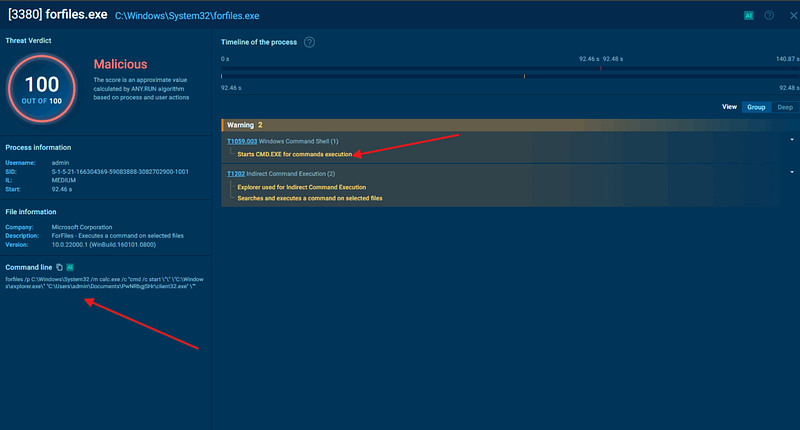
Here’s the trick in plain language:
✔ forfiles.exe
A built-in Windows tool used to loop through files.
✔ /m calc.exe
A dummy match — calc.exe will always exist.
✔ /c "cmd /c start "" "C:\Windows\explorer.exe" …"
The real payload:
Make explorer.exe launch client32.exe, so the RAT inherits a trusted parent process.
This evasion technique is known as:
Signed Binary Proxy Execution (T1218)
and Indirect Command Execution.
ANY.RUN flagged this under:
- “Explorer used for indirect command execution”
- “Starts CMD.EXE for commands execution”
Attackers love this technique because launching malware through explorer.exe looks like a normal user action.
Cyber Security Notes and Cheat Sheets 👇

Establishing C2 Connection
After execution, NetSupport RAT immediately starts beaconing.
ANY.RUN shows multiple alerts:
- NetSupport Remote Admin Checkin
- NetSupport GeoLocation Lookup
- Win32/NetSupport CnC Activity observed
- HTTP POST traffic over port 443
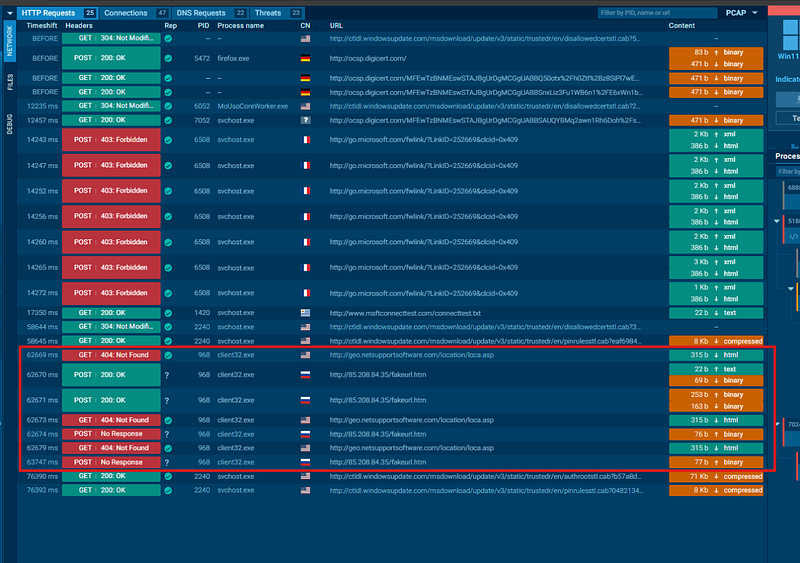
This is typical behavior:
- The RAT checks external IP (geolocation lookup).
- It registers itself with the attacker’s control panel.
- It begins accepting remote commands.
Since it uses HTTPS, the traffic looks legitimate without deeper IDS/EDR inspection.

System Enumeration by the RAT
Next, the RAT gathers system info:
- Computer name
- Language and locale
- Proxy settings
- Internet Explorer security settings
- Registry values
This helps attackers decide:
- Whether the machine is valuable
- Whether additional payloads should be installed
- Whether region-specific rules apply (e.g., don’t infect Russia or CIS)
ANY.RUN captured all of this in the behavior logs.
No Embedded Malware Configuration
NetSupport RAT’s configuration doesn’t appear in the binary itself. This is normal. NetSupport stores its malicious config in external files, one more way it evades static detection.

Indicators of Compromise (IOCs)
Here are the most relevant IOCs from the analysis:
Hashes
MD5: 21BDCCAB6205F3E374E798D115B834F8
SHA1: 1D6250ADA329DBA39DE18C4A03139755623532CE
SHA256: 842A7729677C61B425550EC7EC33B5D5CBC9F8C5CA4DD62AC94C9CB932080137
Dropped File
C:\Users\admin\Documents\PwNRbgjSHr\client32.exeMutex
NetSupportNetwork Signatures
- ET REMOTE_ACCESS NetSupport Remote Admin Checkin
- ET REMOTE_ACCESS NetSupport Response
- Win32/NetSupport CnC Activity observed (fakeurl.htm)
Network Behavior
- HTTPS POST to suspicious external servers
- Geolocation lookup requests
These IOCs can be fed into SIEM, EDR, and network monitoring tools to check for additional infected endpoints.
How to Clean NetSupport RAT from Endpoints
Cleaning a NetSupport RAT infection requires a careful approach because it uses legitimate binaries. Here’s the recommended workflow:
✔ 1. Kill the Running Process
Look for:
client32.exeTerminate it through Task Manager or:
taskkill /IM client32.exe /F✔ 2. Remove Persistence
Check these locations:
Startup folders
%APPDATA%
%LOCALAPPDATA%
C:\Users\<user>\AppData\Roaming
Run / RunOnce keys
HKCU\Software\Microsoft\Windows\CurrentVersion\Run
HKLM\Software\Microsoft\Windows\CurrentVersion\Run
Scheduled tasks
Search for unexpected tasks referencing client32.exe or the dropped folder.
✔ 3. Delete Dropped Files
Delete the folder:
C:\Users\<user>\Documents\<random letters>\and the payload:
client32.exe✔ 4. Investigate How the Payload Arrived
Check:
- Browser history
- Downloads folder
- Email attachments
- PowerShell history (
Get-History)
NetSupport RAT rarely arrives on its own it’s usually dropped by phishing loaders.
✔ 5. Reset Browser Settings
Because the malware reads proxy settings and IE configuration, resetting defaults is often necessary.
✔ 6. Reset Network Proxy Values
Check for malicious proxy entries:
inetcpl.cpl → Connections → LAN Settingsor via registry:
HKCU\Software\Microsoft\Windows\CurrentVersion\Internet Settings✔ 7. Scan with EDR or AV Tools
Choose one:
- Microsoft Defender Offline Scan
- Sophos / SentinelOne / CrowdStrike
- Malwarebytes
These tools detect NetSupport RAT patterns easily since the behavior is well-known.
✔ 8. Rotate Credentials
Assume the attacker harvested:
- browser passwords
- saved tokens
- email credentials
- VPN accounts
Force password resets.
Conclusion
NetSupport RAT is a perfect example of why defenders can’t rely solely on “bad file, good file” logic.
The binary here is legitimate, the behavior is not.
In the ANY.RUN analysis, we saw:
- PowerShell being abused
- A clever forfiles.exe trick to hide execution
- Dropped files disguised as legitimate tools
- Rich network beaconing
- Indicators of C2 interaction
- Plenty of MITRE-mapped activity
By understanding these behaviors and indicators, you’re much better equipped to detect, analyze, and remove NetSupport RAT in the real world.



