JWTs Explained | HackTheBox Criticalops Writeup
Introduction

Introduction
If you’ve spent any time building modern web apps, you’ve definitely come across JWTs , JSON Web Tokens. They show up in login systems, APIs, mobile apps, microservices, and basically any architecture that wants to avoid traditional, heavy session stores.
But here’s the thing:
Most developers misunderstand how JWTs actually work , and even worse, how they fail.
So let’s take a clearer, more grounded tour of JWTs:
- What they are
- How they’re built
- How they’re used in real applications
- Why they’re powerful
- And why they can introduce security holes if you’re not careful
Grab a coffee. This is the JWT deep dive I wish I had years ago.

What Exactly Is a JWT?
A JWT , JSON Web Token , is basically a compact piece of JSON that the server signs to prove it’s legit.
It travels back and forth between client and server, carrying small bits of user info (called claims). JWTs let you authenticate users without storing session data on the server. No session IDs. No sticky sessions. No please wait while the server looks you up.
They’re perfect for:
- Modern SPAs (React, Vue, Angular)
- Mobile apps
- APIs
- Microservices
A JWT is not encrypted by default , it’s only encoded. That means anyone who gets the token can read the payload. They just can’t tamper with it (assuming signature validation is correct).
The Anatomy of a JWT
A JWT is made of three Base64URL-encoded parts:
header.payload.signatureLet’s break it down in plain English.

1. The Header
This is the metadata : the type and the signing algorithm.
Example:
{
  "typ": "JWT",
  "alg": "HS256"
}
alg tells the server how the token was signed.
2. The Payload
This is where your claims live : user ID, roles, timestamps, metadata.
Example:
{
  "iss": "your-app",
  "sub": "user-123",
  "exp": 1735689600,
  "iat": 1735686000
}
Some claims are standard (issuer, subject, expiration), but you can include custom ones too.
Important: This data is readable by anyone holding the token. Don’t put passwords or credit card numbers here.
3. The Signature
This is the part that ensures integrity. The server takes:
base64(header) + "." + base64(payload)… runs it through an algorithm like HS256 or RS256 … … and produces the signature using a secret key or private key. When the server receives the token again, it repeats this process.
If the signature matches, the token is legit. If not? Someone tampered with it.
How JWT Authentication Works Step-By-Step
Let’s visualize the full flow in a real web app:

Step 1 : User Logs In
User enters email/password → server verifies them.
Step 2 : Server Issues a JWT
The server signs a JWT containing user data and sends it to the client.
Step 3 : The Client Stores the Token
There are two common ways:
LocalStorage: Easy but vulnerable to XSS.HttpOnly Cookies: Safer, but requires CSRF considerations.
Step 4 : Client Sends Token with Each Request
Usually via the Authorization header:
Authorization: Bearer <token>Discover more
Cyber
Blue Team training
Metasploit framework guides
Online learning platforms
Cybersecurity
Wazuh SIEM Guide
CISSP study materials
Digital Media Products
CAPTCHA
Wireshark analysis tools
Step 5 : Server Verifies the Token
It checks:
- Signature
- Expiration
- Issuer/audience
- The user’s permissions
If everything looks good → proceed. If not → reject.
Practical JWT Security Testing Scenario | HackTheBox CriticalOps
I will do a detailed walkthrough of the “HackTheBox CriticalOps” challenge, demonstrating how a critical vulnerability in the web application’s authentication mechanism could be exploited. The challenge involved a system infrastructure monitoring tool. After logging in, we discovered a ticketing system and used Burp Suite to intercept web traffic, identifying a JSON Web Token (JWT) used for session management.
The core vulnerability was found by inspecting the client-side JavaScript files. The secret key used to sign the JWTs was hardcoded directly into the code and visible to anyone examining the site’s assets. With the secret key exposed, we used a custom Python script to forge a new, valid token. We modified the payload of the token, changing the role from “user” to “admin“. By replacing the original session token with the forged admin token, we successfully escalated the privileges. This new level of access allowed us to send a request to the ticketing system as an administrator, which returned all tickets, including the one containing the flag.
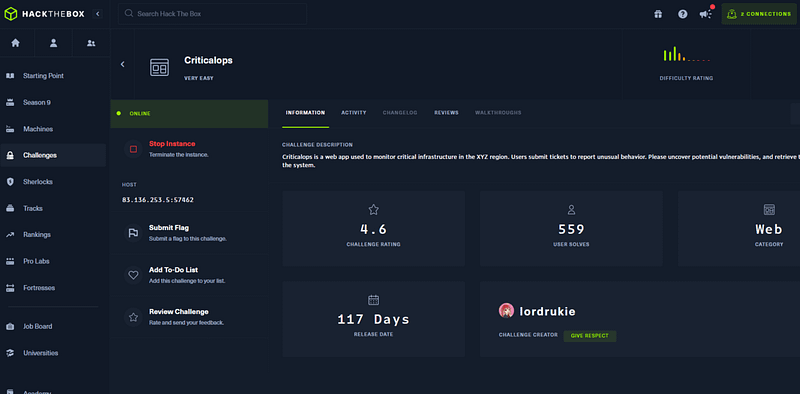
HackTheBox Criticalops Challenge Description
Criticalops is a web app used to monitor critical infrastructure in the XYZ region. Users submit tickets to report unusual behavior. Please uncover potential vulnerabilities, and retrieve the hidden flag within the system.
Initial File Analysis
Right off the bat, the landing page was pretty much a brick wall, just a static page with the standard register or log in options. Nothing to dig into there. So, my first step was to just read the room. I scanned the content to get the context of the machine and quickly figured out I was looking at a system infrastructure monitoring and control tool. Then, I spotted a key phrase: Track incidents.
That’s the kind of language that immediately piques my interest. It strongly suggested there was a ticketing system lurking under the hood, which became my new target for exploration.
My natural next step was to peek at the source code, but that turned out to be a dead end. All I found was a single-line script that was clearly obfuscated, so no low-hanging fruit there. The register and login pages were just as unhelpful.

I also spotted two key requests firing off for my ticket. It was a classic setup:
- A
POSTrequest, which was clearly responsible for creating the ticket under the Report New tab. - A
GETrequest, which pulled all my existing tickets into the Incidents tab.
That GET request was the one that got my attention, mainly because it contained a JWT for authorization. That’s always a fun target.
My thinking was, if that token is a) predictable or b) not being validated properly, I might be able to manipulate it. So, I sent that GET request straight to the Repeater. My goal? To see if I could tweak that JWT and get the server to return all tickets, not just mine.
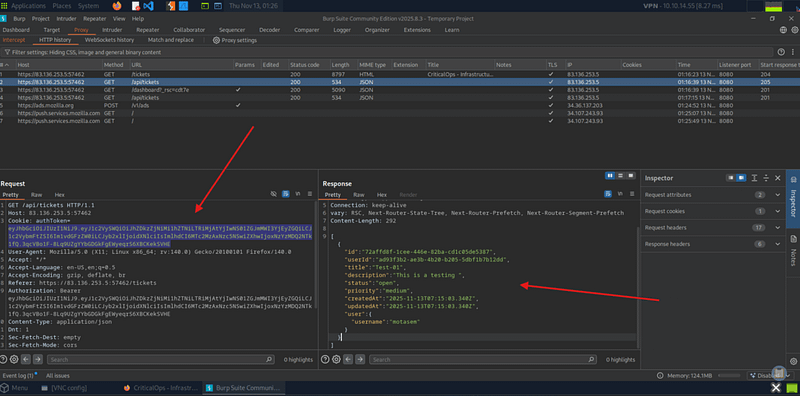

Inspecting Browser Developer Tools
My recon started in Chrome DevTools. I was watching the Network tab (filtering for XHR) and digging through the Sources tab, where I immediately noticed the app was serving chunked JavaScript (e.g., main-appXXXXX.js). A quick check with Wappalyzer confirmed my suspicion: this is a Next.js app.
Now, I could spend hours trying to piece together that chunked JS, but I decided to hunt for low-hanging fruit first: hardcoded secrets. I ran a simple search for the word “secret” across all the source files, and… boom. Two strings popped right out:
SECRET_DO_NOT_PASS_THIS_OR_YOU_WILL_BE_FIRED(Someone’s definitely getting fired.)SecretKey-CriticalOps-2025
Tracing them was key. The first one (...FIRED) was used in a function (72948) that looked like the standard login flow. That would likely only get me authenticated. But that second one? SecretKey-CriticalOps-2025. That was being fed into function 71859, which had all the hallmarks of the JWT creation logic. This is the vulnerability. The ...FIRED secret just proves who I am, but the ...2025 secret is the actual signing key. It lets me validate any token. The path forward was obvious: a classic privilege escalation. I can now craft my own token, add a role: admin claim, and sign it myself with the secret we just found.


Now its time to create a python script that signs the secret we just found:

Python Code
import jwt

secret = "my_super_secret"  # your secret
signing_key = secret.encode()  # to bytes

token = jwt.encode({"user": "test"}, signing_key, algorithm="HS256")
Print (Token)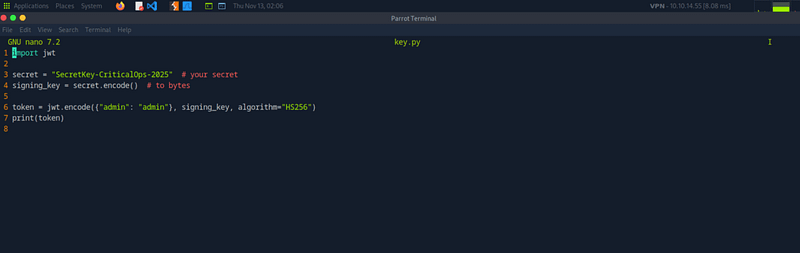

So, I took my newly signed admin token, attached it to the request, and fired it off.
It worked perfectly. The server was completely fooled. Instead of just my tickets, I got a full data dump of every ticket received by the administrator, and sitting right inside that data was the flag.

Where JWTs Shine
JWTs exist for a reason. They solve real problems.
1. Stateless Authentication
No more storing sessions in Redis or databases.
2. Great for distributed systems
Microservices don’t need to talk to a single session store. Each service just verifies the token independently.
3. Cross-platform friendly
Web apps, mobile apps, IoT devices , all can use JWTs.
4. Portable, tiny, and fast
They’re small and easy to pass around HTTP responses, cookies, or headers.
So When Should You NOT Use JWTs?
Despite the hype, JWTs are not the perfect solution for every project.
Avoid or rethink JWTs when:
- You need instant logout
- You have a simple monolithic app
- Server-side sessions are easier and safer
- You need to store very sensitive data in the token
- Your token lifetimes will be long
- You don’t want to deal with revocation logic
Classical session cookies may actually be the better answer.
A Simple Node.js Example
Here’s how issuing a JWT might look:
const jwt = require('jsonwebtoken');

app.post('/login', (req, res) => {
  const user = authenticate(req.body);

  const payload = {
    sub: user.id,
    roles: user.roles,
    iat: Date.now() / 1000,
    exp: (Date.now() / 1000) + 3600
  };

  const token = jwt.sign(payload, process.env.JWT_SECRET, { algorithm: 'HS256' });

  res.json({ token });
});
And verifying it:
app.get('/protected', (req, res) => {
  const token = req.headers.authorization?.split(" ")[1];

  try {
    const decoded = jwt.verify(token, process.env.JWT_SECRET);
    res.json({ message: "Access granted", user: decoded });
  } catch {
    res.status(401).json({ error: "Invalid or expired token" });
  }
});
This works , but you still need secure storage, expiration handling, and revocation logic.
Cyber Security Notes and Cheat Sheets 👇

Final Thoughts
JWTs make authentication fast, portable, and scalable , but they also require serious security hygiene. They shine in distributed systems but can cause real damage if misused in simple apps that don’t need them. Here’s the balanced truth:
- Use JWTs when you need stateless auth across multiple clients.
- Use sessions when your app is simple and logout must be immediate.
- And always, always treat tokens like gold , because in a way, that’s exactly what they are.



