Detecting Linux Kernel Backdoors: TryHackMe Sneaky Patch Walkthrough
In my analysis, I explore how to detect and investigate a kernel backdoor in a Linux system, a sophisticated threat that can be challenging…

In my analysis, I explore how to detect and investigate a kernel backdoor in a Linux system, a sophisticated threat that can be challenging to uncover.

Understanding Linux Backdoors
I begin by categorizing Linux backdoors into three main types:
BIOS/UEFI/initrd Backdoors: These are the most dangerous as they are installed at the BIOS level, allowing them to bypass standard security measures and even survive a complete reinstallation of the operating system. Removing them typically requires reflashing the BIOS.
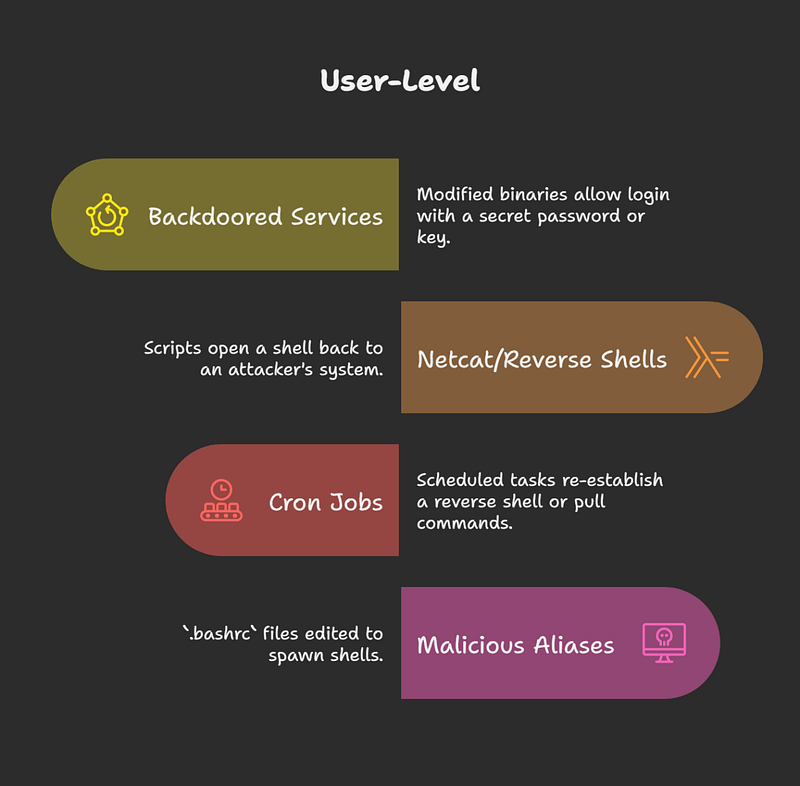
User-Level Backdoors: These are the most common and include techniques like:
Modified Binaries: Altering programs to allow login with a secret password.
Reverse Shells: Using scripts, such as those written with Netcat, to open a shell back to an attacker’s system.
Cron Jobs: Scheduling tasks to re-establish a reverse shell or execute malicious commands.
Malicious Aliases: Editing .bashrc files to create aliases that spawn a shell.
Kernel-Level Backdoors: These are more advanced and involve modifying the Linux kernel to hide processes. Because they operate with the highest privileges, they are much harder to detect. Examples of kernel-level rootkits include Adore-Ng and Dyamorphine.
Methods for Creating Backdoors
I then detail several common methods used to create backdoors:
- LD_PRELOAD Injection: Creating a malicious shared library (
.sofile) to intercept function calls. - SSH Authorized Keys: Adding an attacker’s public key to the
authorized_keysfile to gain passwordless access. - SetUID Binaries: Creating or modifying binaries to execute with root privileges.
- Bind/Reverse Shells: Setting up a listener on a port or connecting back to an attacker’s machine to provide a remote shell.
- Hidden Users: Creating users with a UID of 0 or hiding them from the
/etc/passwdfile. - Backdoored Packages: Replacing common system binaries like
lsorpswith trojanized versions.
Loadable Kernel Modules (LKMs)
I explain that attackers often use Loadable Kernel Modules (LKMs) to inject malicious code into the kernel. This is typically done using the insmod or modprobe commands. Once injected, the malicious code can modify kernel structures and then hide itself to evade detection.
Practical Demonstration: The “Sneaky Patch” Room on TryHackMe
To illustrate how to investigate a kernel-level backdoor, I walk through the “Sneaky Patch” room on TryHackMe. The challenge involves analyzing a Linux system with a suspected kernel backdoor.
My investigation follows these steps:
- Identifying the Backdoor: I start by listing and sorting the loaded kernel modules using the command
lsmod | sort. This reveals an unusual module named “spatch.” - Investigating the Module: I then use the
sudo modinfo spatchcommand to get more information about the module. The output shows the author as “Cipher” and a suspicious description: “Cipher is always root.” This is a strong indication of a malicious module, as legitimate modules typically have recognized authors and proper documentation. For comparison, I runsudo modinfo x_tableson a legitimate module to show the difference. - Analyzing the Associated File: I copy the full path to the
spatch.kofile for further analysis. - Extracting the Secret: I run the
stringscommand on thespatch.kofile:strings /lib/modules/6.8.0-1016-aws/kernel/drivers/misc/spatch.ko. This command reveals a hexadecimal string labeled “the secret.” - Decoding the Flag: Finally, I use CyberChef to decode the hexadecimal string, which reveals the flag and completes the challenge.
TryHackMe Sneaky Patch Answers
Flag is here



