CVE-2025–53770 EXPLAINED: ToolShell RCE + Live SOC Analysis (Letsdefend SOC342)
Introduction
Introduction
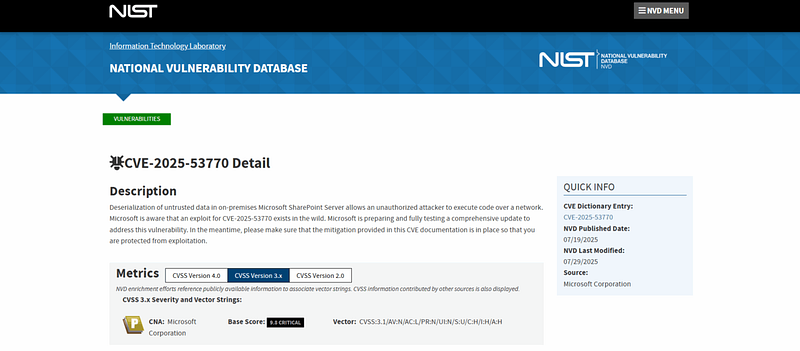
In this guide, I provide a detailed walkthrough for security analysts on how to identify, investigate, and respond to the ToolShell vulnerability (CVE-2025–53770). This critical vulnerability affects on-premises Microsoft SharePoint servers and allows unauthorized attackers to achieve remote code execution through the unsafe deserialization of untrusted data.
Understanding the Attack
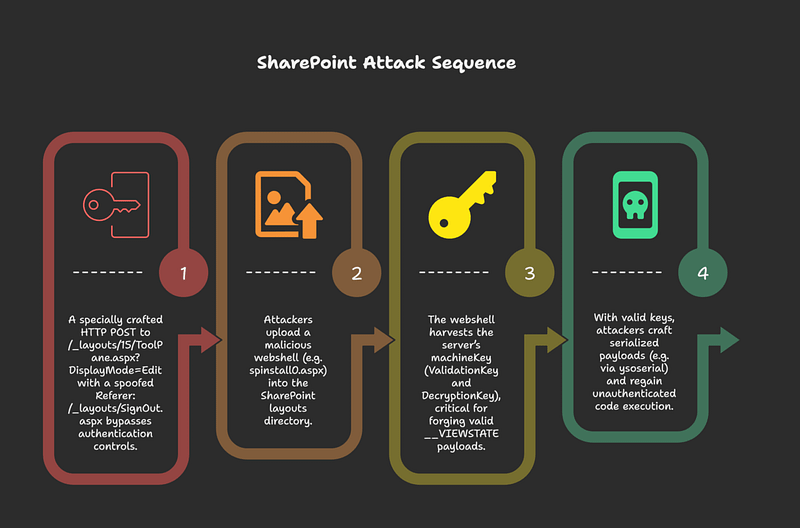
Initial Access
A specially crafted HTTP POST to /_layouts/15/ToolPane.aspx?DisplayMode=Edit with a spoofed Referer: /_layouts/SignOut.aspx bypasses authentication controls.
Payload Deployment
Attackers upload a malicious webshell (e.g. spinstall0.aspx) into the SharePoint layouts directory.
MachineKey Extraction
The webshell harvests the server’s machineKey (ValidationKey and DecryptionKey), critical for forging valid __VIEWSTATE payloads.
Remote Code Execution
With valid keys, attackers craft serialized payloads (e.g. via ysoserial) and regain unauthenticated code execution
Exploiting the Vulnerability
Once the web shell is uploaded, the attacker can harvest critical machine keys, including the validation and decryption keys. These keys are then used to forge valid view state payloads, which ultimately leads to remote code execution on the compromised server.

Indicators of Compromise
1. Malware and Files
client.exe/debug.js- Attackers used PowerShell along with Certutil to download a file named
client.exe(SHA‑256:fd03d881f0b3069f5adec6ae69181899e72fd27b3e75bb9075d0798ed3184274) from IP134.199.202[.]205, saving it asdebug.jslocally. - Ransomware Payload — “4L4MD4R”
- Hosted at
hxxps://ice.theinnovationfactory[.]it/static/4l4md4r.exe(IP:145.239.97[.]206), this UPX-packed GoLang binary decrypts an AES-encrypted payload in memory and launches a file-encrypting ransomware with a ransom demand of ~0.005 BTC. It includes a contact email (m4_cruise@proton[.]me) and a Bitcoin address (bc1qqxqe9vsvjmjqc566fgqsgnhlh87fckwegmtg6p).
2. Webshells & Suspicious Artifacts
SharpyShellwebshell- A stealthy webshell named SharpyShell has been identified, which extracts and exfiltrates cryptographic secrets (e.g., machineKey) via simple GET requests.
- Typical webshell filenames
- The malicious
.aspxfilespinstall0.aspxis frequently used in exploitation attempts, especially when uploaded to the/layouts/15/directory. This is a strong red flag.
3. Network Indicators & Attack Patterns
- Exploit path & spoofing tactics
- Initial access is achieved through an HTTP POST to
/layouts/15/ToolPane.aspx?DisplayMode=Editwith a spoofedReferer: /_layouts/SignOut.aspxheader. - Ransomware distribution chain
- After initial compromise, attackers modify Group Policy Objects (GPOs) to deploy the Warlock ransomware across the network.
4. Behavioral & Process-Level Indicators
- Malicious process chains
- A notable detection signature involves
w3wp.exe(the IIS worker process) spawningcmd.exe, which in turn launchespowershell.exe –EncodedCommand. Such chains are highly unusual and indicative of exploitation. - Behavioral patterns to watch for
- Key behaviors include:
w3wp.exelaunching PowerShell or .NET assemblies.- Unexpected file drops in system directories (e.g., webshells).
- Outbound communications shortly after server compromise.
- Abnormal lateral movement and reconnaissance activity.
5. Detection & Prevention Tools
- EDR, WAF, and DNS-based detections
- Cortex XDR and Cortex Cloud agents — versions noted earlier — can detect and block the full exploitation chain (CVE‑2025‑49704, 49706, 53770, 53771). They also include playbooks for automated response.
- Web Application Firewalls (WAFs), especially Next-Gen versions, along with Advanced URL Filtering and DNS Security, can identify malicious IP addresses associated with the ToolShell exploit chain.
- Symantec & behavioral configurations
- Symantec (Broadcom) products already detect and block attempts to exploit CVE‑2025‑49704, which are related to ToolShell activity
Security Patching and Remediation
The patching process involves a series of critical steps to ensure the vulnerability is fully remediated:

1. Patch Immediately
- SharePoint Server Subscription Edition: KB5002768
- SharePoint 2019: KB5002754 (plus language pack KB5002753)
- SharePoint 2016: KB5002760 (and language pack KB5002759)
Apply them as soon as possible, these are cumulative, so latest updates suffice.
2. Rotate MachineKey
- Rotate before patching, and then again after patching.
- Restart IIS using
iisreset.exe. - Manually inspect and remove any malicious entries in
applicationHost.configorweb.configto avoid automatic reloading of backdoors.
3. Enable AMSI & Defender
- Ensure Antimalware Scan Interface (AMSI) is enabled and in Full Mode (if supported); Defender Antivirus should run on all SharePoint servers.
4. Segment or Disconnect
- If AMSI can’t be enabled, disconnect public-facing servers from the internet or place them behind VPN/authentication solutions.
5. Deploy EDR/XDR & Hunt Actively
- Use Microsoft Defender for Endpoint or equivalent solutions.
- Monitor for suspicious POST requests to
ToolPane.aspxand Referer spoofing. - Utilize threat intel tools like Cortex XDR, Advanced URL Filtering, or Palo Alto’s Cortex tools to detect and block ToolShell activity.
6. Threat Hunting & Indicators of Compromise
- Look for webshells like
spinstall0.aspxin the layouts directory. - Review logs for odd access patterns, especially around ViewState and Referer headers.
- Hunt for DLL payloads, encrypted payload execution, and signs of lateral movement.
7. Incident Response
- Treat affected systems as compromised.
- Engage professional incident responders, contain affected systems, and verify integrity post-reset.
- Evaluate data access, exfiltration, and persistence mechanisms.
8. Post-Mitigation
- Implement Zero Trust Network Architecture (ZTNA) or business VPNs for isolation.
- Enhance logging, backup retention, and resilience planning.

Live Analysis on LetsDefend SOC342
I demonstrate a live analysis of a ToolShell exploitation attempt using the Let’s Defend SIEM platform, showcasing how a SOC analyst would handle such a threat.
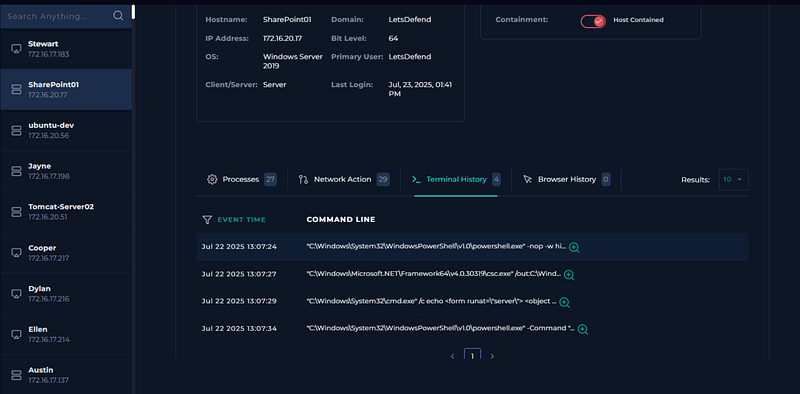
Alert Triage: The first step is to identify the critical vulnerability alert in the monitoring dashboard.
Investigating the Alert: I then investigate why the alert was triggered, which involves filtering logs by the destination IP address of the vulnerable SharePoint server.
Endpoint Security Analysis: I analyze the processes and command lines on the SharePoint server, which reveals suspicious PowerShell activity and encoded commands, a clear indicator of the attack.
Decoding Malicious Payloads: Using CyberChef, I decode the PowerShell commands, revealing the creation of an ASPX web shell and the retrieval of the machine key information.
Confirming the Attack: Based on the evidence, I confirm the attack type as command injection.
Containment: To prevent further damage, I immediately isolate the compromised SharePoint server from the network.
Documenting Artifacts: I document all indicators of compromise, including the SharePoint server’s IP, the attacker’s C2 IP, the web shell hash, and the URLs used in the attack.
Closing the Alert: Finally, I summarize the findings in an analyst note and close the alert.

Commands Observed During the Attack
During the analysis, I identified several commands that are characteristic of this attack:
powershell.exe -nop -w hiddencmd.exe /c echo >> "C:\Program Files\Common Files\Microsoft Shared\Web Server Extensions\15\TEMPLATE\LAYOUTS\15\spsinstall0.aspx"powershell.exe "System.Web.Configuration.MachineKeySection]::get_validationKey(), [System.Web.Configuration.MachineKeySection]::get_decryptionKey(), [System.Web.Configuration.MachineKeySection]::get_compatibilityMode() | Out-File C:\Users\labuser\Documents\output.txt"



