Critical Microsoft SMB Vulnerability | CVE-2025–55234 Explained
Introduction

Introduction
If you run a Windows network, you’re using SMB. It’s the engine that powers all your file and printer sharing. This vulnerability is a serious flaw that allows an attacker on your local network to hijack that process and gain the privileges of another user, potentially even an administrator.

How Does This Attack Actually Work
The vulnerability is a classic NTLM Relay Attack.
Think of it like this: your computer tries to log into another machine. An attacker, sitting silently on the same network, intercepts that login attempt. They can’t see your password, but they can grab the encrypted handshake. They then “relay” or forward that handshake to a critical server, like your main file server. The file server gets tricked into thinking the attacker is you and grants them access with your permissions.
This whole attack is only possible because of a common misconfiguration. Windows has two key security features designed to stop exactly this kind of thing, but they are often not turned on by default:
- SMB Signing: This digitally “signs” every message between you and the server, proving they haven’t been tampered with. If an attacker tries to relay a message, the signature won’t match, and the server will reject the connection.
- Extended Protection for Authentication (EPA): This ensures that the login attempt is specifically intended for the server it’s being sent to, which breaks the relay.
When these are off, you’re leaving the door wide open for this attack.
Technical root causes
- The issue is tied to improper authentication (CWE-287) paths in SMB Server when SMB signing and/or Extended Protection for Authentication (EPA) aren’t enforced. In these configurations, NTLM credentials can be relayed to SMB, letting an attacker authenticate as the victim and escalate privileges. Microsoft’s September 9, 2025 updates emphasize enabling audit events and hardening rather than introducing a brand-new crypto control, i.e., the vulnerability is primarily configuration-dependent exposure of a known relay class
High-level PoC
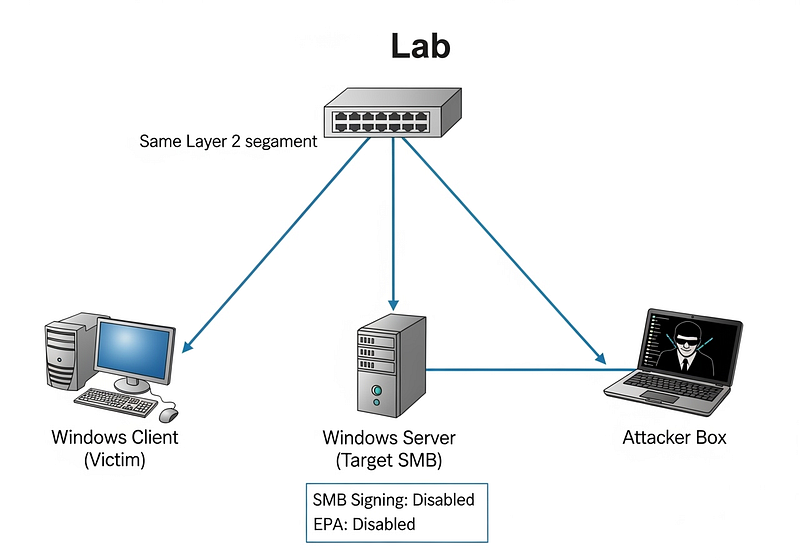
- Lab topology: One Windows client (victim), one Windows server (target SMB), one attacker box on the same L2 segment. Ensure the server does not require SMB signing or EPA.
- Coerce auth / capture NTLM: Trigger the client to authenticate (e.g., printer/webdav/coercion vector) and capture the NTLM challenge/response.
- Relay to SMB: Relay the captured NTLM to the target SMB server.
- Result: Session established on the server as the victim user, enabling privilege escalation (e.g., write to shares, drop service binaries, or schedule tasks depending on victim’s rights).
- Detection artifacts: After installing Sept-2025 updates with auditing enabled, you should see SMBServer Audit events such as 3021 (client lacks signing) and 3024–3026 (EPA/SPN issues) when non-compliant clients touch the server. Use these to validate exposure and hardening rollout.
(Several vendors and researchers note public disclosure and PoC chatter around Patch Tuesday, but avoid running unvetted exploit code in production networks.)
Exploitation Steps as Part of a Pentest
- Reconnaissance & access surface mapping. Attacker identifies network segments with SMB hosts, exposed file/printer shares, legacy devices, or clients on the same L2/L3 segment that will talk to SMB servers.
- Authentication coercion. The attacker coerces a victim or client to authenticate to an attacker-controlled endpoint. Common coercion methods (at a conceptual level) include tricking a user or device into accessing a resource you control (printer path, UNC path, WebDAV link, or similar), the goal is to cause the client to perform NTLM auth to the attacker.
- Capture & relay. Instead of cracking the credentials, the attacker forwards (relays) the authentication to the target SMB server that accepts NTLM without signing/EPA, allowing the attacker to authenticate as the victim to that SMB server.
- Use of the authenticated session. Once authenticated, the attacker performs actions permitted to that account (file read/write, drop binaries, modify shares, create scheduled tasks, etc.), then pivots or escalates further.
This is a protocol/relay abuse , attackers reuse legitimate credentials rather than guessing or cracking them.

Detection using Splunk
NTLM network logons:
Search last 24 hours for successful network logons using NTLM. Here my purpose is to find accounts using NTLM from a source host that are authenticating to multiple machines or many times in the window.
index=wineventlog EventCode=4624 Logon_Type=3 Authentication_Package="NTLM" earliest=-24h@h
| stats count AS attempts, dc(ComputerName) AS distinct_destinations by Account_Name, Source_Network_Address
| where attempts >= 5 OR distinct_destinations >= 3
| sort -attempts
Host authenticating to many SMB servers
Here one source authenticating to a lot of servers quickly , I conclude a suspicious lateral movement attempt.
index=wineventlog EventCode=4624 Logon_Type=3 Authentication_Package="NTLM" earliest=-24h@h
| stats dc(ComputerName) AS dest_count, values(ComputerName) AS dest_list by Source_Network_Address, Account_Name
| where dest_count >= 5
| table Source_Network_Address, Account_Name, dest_count, dest_list
New service / scheduled task after recent SMB activity
The below query triages cases where an NTLM auth is followed quickly by service or scheduled task creation.
index=wineventlog (EventCode=4624 Logon_Type=3 Authentication_Package="NTLM") OR EventCode IN (4697,4698) earliest=-1h@h
| transaction Account_Name maxspan=30m startswith=EventCode=4624 endswith=EventCode IN (4697,4698)
| where eventcount>1
| table _time, Account_Name, Source_Network_Address, ComputerName, eventcount
Audit events for SMB signing/EPA
Here I try to find clients that fail signing/EPA auditing (useful during hardening rollout). Confirm exact EventIDs with your MS KB for the OS build before use.
index=wineventlog EventCode IN (3021,3024,3025,3026) earliest=-7d@d
| stats count by EventCode, ComputerName, Account_Name, Source_Network_Address
| sort -count
Detection using Kibana and Elastic Stack
NTLM network logons (last 24h)
Execute the below query then in the Kibana visualization / Lens: aggregate by winlog.event_data.TargetUserName, source.ip, and host.name, and use a bucket aggregation to count distinct host.name per source.ip. Alert when distinct hosts > threshold.
event.code: "4624" and winlog.event_data.LogonType: "3" and winlog.event_data.AuthPackageName: "NTLM" and @timestamp >= now-24hSource IP authenticating to many hosts
Execute the below query then in in Kibana: group by source.ip, count distinct host.name > 5 in 24h.
event.code: "4624" and winlog.event_data.LogonType: "3" and winlog.event_data.AuthPackageName: "NTLM" and @timestamp >= now-24hService / Task creation after NTLM auth (last 60 minutes)
KQL to find relevant event IDs, Then use correlation rule: join events by winlog.event_data.TargetUserName and source.ip within 30 minutes and escalate if both are present.
(event.code: "4624" and winlog.event_data.LogonType: "3" and winlog.event_data.AuthPackageName: "NTLM" and @timestamp >= now-60m)
 OR
(event.code: "4697" or event.code: "4698") and @timestamp >= now-60m
SMB signing/EPA audit events (if logged under Microsoft-Windows-SMBServer)
event.code: "3021" or event.code: "3024" or event.code: "3025" or event.code: "3026"Reminder: verify event codes for your OS/patch level.
Mitigation & patch
Microsoft has rated this an 8.8 out of 10 in severity, so it’s critical to act fast. Here’s your game plan.
Step 1: Patch Everything (But Understand What It Does)
First things first, install the September 9, 2025, security updates from Microsoft on all your Windows clients and servers.
Now, here’s the important part: this patch doesn’t magically fix the vulnerability. Instead, it gives you the tools to fix it safely. It adds new audit logs that will tell you exactly which devices on your network will break before you turn on the new security settings.
Step 2: Go Hunting for Problems
After patching, you need to find any old or misconfigured devices that don’t support modern SMB security. You do this by checking the Windows Event Log on your file servers for these new Event IDs:
- Event ID 3021: This tells you a device tried to connect without SMB signing.
- Event IDs 3024–3026: These tell you a device tried to connect without supporting EPA.
Let these logs run for a while to build a list of incompatible devices. These might be old printers, scanners, or outdated third-party software that you’ll need to update or replace.
Step 3: Flip the Hardening Switches
Once you’re confident you won’t break anything critical, it’s time to lock down SMB. You can do this via Group Policy (GPO).
To enable SMB Signing:
- Navigate to
Computer Configuration > Administrative Templates > Network > Lanman Server. - Find the policy named
Microsoft network server: Digitally sign communications (always)and set it to Enabled.
To enable EPA:
- Follow Microsoft’s latest guidance (KB 5066913) to enable Extended Protection for Authentication once you’ve identified and remediated any incompatible clients.
Once these are enabled, the NTLM relay attack path for this CVE is closed.

Conclusion
This vulnerability is a great reminder that NTLM is an old and frequently abused protocol. While you’re at it, consider a broader project to minimize or disable NTLM wherever possible in your environment and push for Kerberos authentication instead. Hardening SMB is a fantastic and necessary step, but treating the root cause is even better.



